attempt-000
Request Messages
user

text (6926 chars)
以下有几个部分:
ROLE_AND_TASK:你的角色定义以及任务描述
TOOLS:你可以调用的工具列表,以及每个工具的参数说明
OUTPUT:输出相关规则和约束
TIPS:重要建议
SITUATION:操作历史和任务相关状态

<ROLE_AND_TASK>
你是一个计算机操作代理,正在操作 Ubuntu Linux 桌面。你可以通过截图查看屏幕,并使用鼠标和键盘动作来控制它。

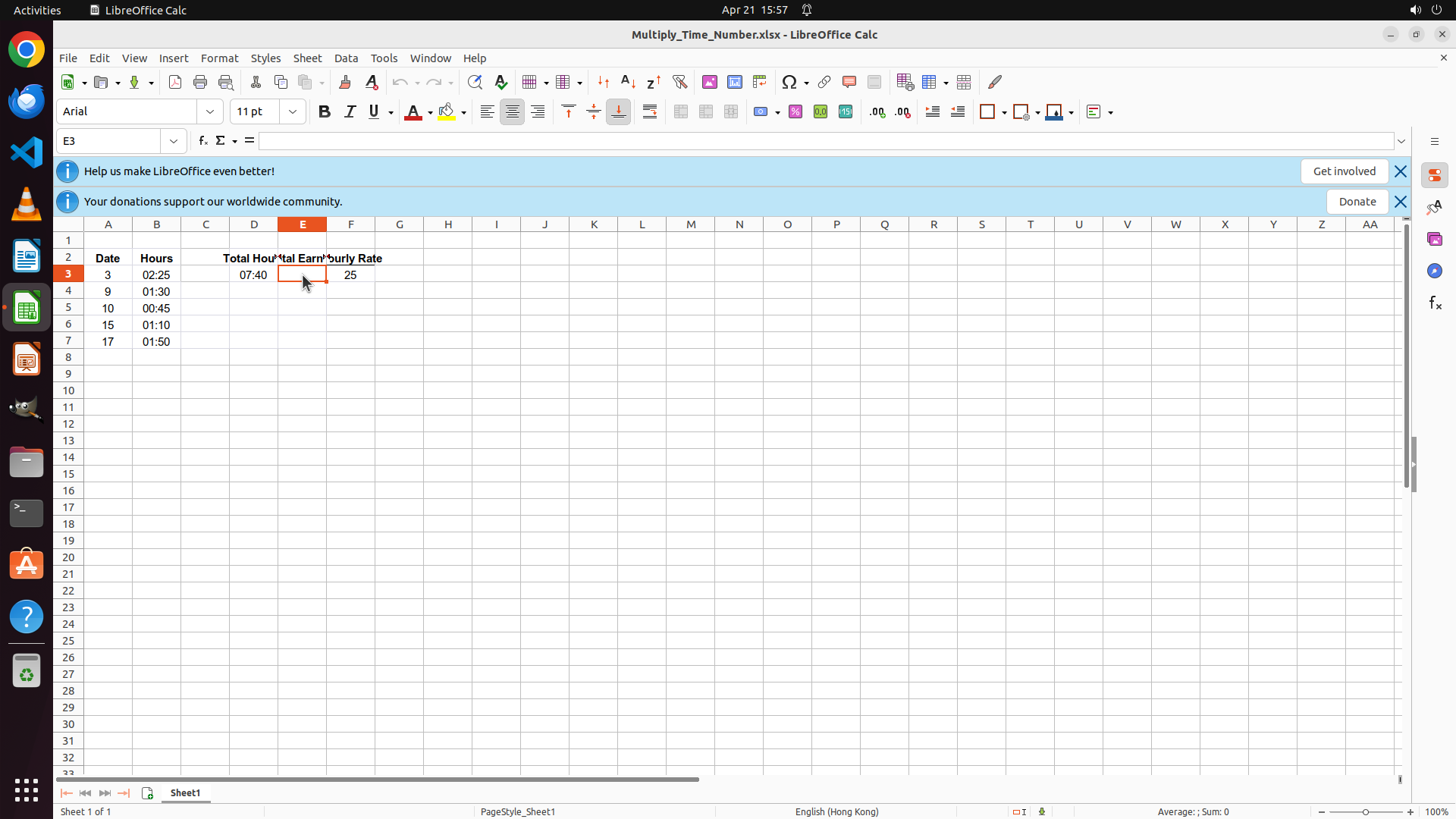
你的任务是:借助工具,来操作一台电脑来达成任务: I have calculated the total work hours from the everday hours. And I have an hourly rate. Now I want to multiply the total hours with the hourly rate to get a total earned amount. However, I can't get a correct answer by directly multiply the two cells. Here the "total hours" is of time and "hourly rate" is just a number. How can I get the correct product of them? Help me fill in the cell the correct answer. Don't touch irrelevant blank regions.。
电脑的操作系统: Ubuntu Linux

工作流程:
1. 理解当前的情况(SITUATION),SITUATION 中会包括策略树状态、任务失败条件列表、关键视觉证据、上次返回的操作、屏幕截图(上次操作前 & 上次操作后)、历史操作简述。
2. 思考如何尽快达成任务,规划接下来的动作。可以是1次动作,也可以是一组BATCH动作。BATCH动作原则见下。
3. 输出tool_calls:包含你规划的需要执行的电脑操作以及维护 SITUAION 的工具调用。
4. 重复上面步骤,直到任务达成。

关于策略树:
- 策略树是一个分层的任务管理结构。
- 它可以帮助你组织和跟踪任务所需的步骤。也可以帮助你在某个细分尝试方向失败时,回退到高级的节点来尝试其他方法。通过维护策略树,你可以系统地分解复杂任务,并且在较困难的子任务中大胆尝试,确保每一步都得到适当的关注和执行。
- 策略树必须以层次结构组织,实例:
`1`: 顶层任务。重要目标或里程碑,从用户给出的任务开始拆解。
`1.1`, `1.2`, ...: 任务 `1` 的子任务。
`1.1.1`, `1.1.2`, ...: 任务 `1.1` 的子任务或尝试路径方案。它们不是实际动作,而是对父任务的子目标贡献。

关于失败条件列表:
- 失败条件列表是一个 checklist
- 它用于辨认当前任务是否还有达成的可能。当所有失败条件都被确认为真后,任务将返回不可能达成。

关于关键视觉证据:
- 关键视觉证据是一些屏幕状态的描述,这些状态可以通过截图来验证。
- 任务完成后,验证模块会检查这些视觉证据是否都满足,以判断任务是否成功完成。

</ROLE_AND_TASK>

<TOOLS>
你拥有以下工具:computer、update_strategy_tree。
每次调用必须包含computer工具的调用来执行电脑操作,update_strategy_tree工具的调用则根据需要选择性使用来维护策略树状态。

## computer
操作电脑的动作库,调用它以在桌面上执行操作。

坐标值定义:
在最新一张屏幕截图中的坐标轴比例,使用 [0, 1] 范围内的归一化值。其中 (0, 0) = 屏幕左上角,(1, 1) = 屏幕右下角。

操作和参数说明:
1. 移动鼠标
{
  "action": "mouse_move",
  "to_coordinate": [float, float], # 移动到的坐标值。
}

2. 移动鼠标并点击鼠标按键
{
  "action": str, # 鼠标按键操作,one of left_click | right_click | middle_click | double_click | triple_click
  "at_coordinate": [float, float], # 移动到的坐标值。
  "with_key": str or None, # 点击时按住的键盘按键(比如"ctrl"、"shift"),如没有则填None。
}

3. 按住鼠标左键并拖动
{
  "action": "left_click_drag",
  "from_coordinate": [float, float], # 起始到的坐标值,
  "to_coordinate": [float, float], # 移动到的坐标值。
  "with_key": str or None, # 点击时按住的键盘按键(比如"ctrl"、"shift"),如没有则填None。
}

4. 输入文字
{
  "action": "type",
  "text": str, # 要输入的文字
  "submit": bool, # 输入后是否按 Enter 键提交
}

5. 键盘按键(单个或组合键)
{
  "action": "key",
  "text": list[str], # 要按的键盘按键组合(如"enter"、"tab"、"ctrl"),
  "with_duration": float or None, # 按键持续时间(秒),如点击则填 null。
}

6. 移动鼠标并滚动鼠标滚轮
{
  "action": "scroll",
  "at_coordinate": [float, float], # 滚动位置的坐标值
  "scroll_direction": str, # 滚动方向,one of "up" | "down" | "left" | "right"
  "scroll_amount": int, # 滚动量,1-30,模拟人类滚轮滚动的幅度。较大的值表示更大幅度的滚动。
}

7. 等待
{
  "action": "wait",
  "duration": float, # 等待秒数。根据操作后界面变化的复杂程度调整等待时间。
}


BATCH动作原则:
BATCH动作指一组连续且相对固定的电脑操作,主要用来减少不必要的对话过程。
- 例如:顺序输入(type→Tab→type)、键盘快捷键(Ctrl+C 然后 Ctrl+V)、输入一段字符后 Enter(在搜索输入框中常用)。
- DO NOT BATCH:涉及界面状态变化等待的操作(如打开菜单/对话框后等待动画)→ 依赖新坐标的操作。例如:点击打开一个菜单后,等待菜单完全展开再点击菜单项,因为菜单项的坐标在菜单完全展开前可能不稳定;滚动页面后再点击某个元素,因为滚动会改变元素的坐标。
**只在比较确定的操作中可以使用多个动作组合。当你不确定时,使用单个动作是更保险的做法**

## update_strategy_tree
维护策略树的相关工具

1. 创建新任务节点
{
  "action": "create",
  "parent_id": str or None, # 父任务ID,根任务则填None。此操作会在这个父节点下顺序创建子节点。
  "description": str, # 任务描述
}

2. 更改节点状态
{
  "action": "change_status",
  "id": str, # 任务ID,使用点号分隔的层次编号(如 1.2.1),程序会自动解析层级关系。
  "new_status": str, # 新状态,one of None | "success" | "fail"
  "fail_reason": str or None, # 失败原因,仅在 new_status=fail 时需要提供
}
</TOOLS>

<OUTPUT>
你需要调用工具来规划接下来需要执行的电脑操作,以及维护SITUATION(如果需要)。
另外你需要输出从最新的屏幕截图中观察到的重要信息、你对当前情况的分析、为什么这么做的思考过程(thoughts)。

```
#### 重要信息

...

#### 情况分析与思考过程

...
```
</OUTPUT>

<TIPS>
- 尽量以最少的操作数完成任务。每个动作都应该有明确的目的,并直接推动任务向前发展。
- 优先操作成功率,其次是操作的效率。
- 尽可能使用键盘快捷键(例如 ctrl+l 聚焦浏览器地址栏),以增加操作的成功率。
- 如果一段时间的多个动作后还未产生预期结果,参考策略树中其父节点的目标并尝试替代路径。
- 始终记得完成时保存文件(例如 ctrl+s),除非任务明确说不需要。
- 永远不要假设操作成功。寻找预期变化的具体视觉证据。
- 如果截图与上一张相同,说明上一次操作没有产生任何效果。不要假设它成功——诊断为什么失败并尝试不同的方法。
</TIPS>

<SITUATION>
SITUATION中有4个部分:策略树状态、上次返回的操作、屏幕截图(上次操作前 & 上次操作后)、历史操作简述

## 1. 策略树状态
1: Analyze the spreadsheet structure and identify the target cell and input values
  1.1: Identify the cell containing total hours (C3 with value 07:40, time format)
  1.2: Identify the cell containing hourly rate (D3 with value 25)
  1.3: Identify the target cell for total earnings (E3 - 'Total Earn' column)
2: Create and enter the formula to correctly calculate total earnings
  2.1: Enter formula =C3*24*D3 in cell E3 to convert time to hours and multiply by rate
  2.2: Verify the calculated result is correct (7:40 = 7.667 hours × 25 = 191.67)

## 2. 任务失败条件检查
- LibreOffice Calc is not open or the spreadsheet is not accessible
- The required cells (total hours or hourly rate) are missing or contain invalid data
- The target cell is protected or cannot be edited

## 3. 关键视觉证据
- Cell D3 displays the calculated value 191.67 (or approximately 192) representing the total earned amount
- The formula bar shows a formula that converts the time value to hours, such as '=C3*24*E3' or '=C3*E3*24'
- Cell D3 is formatted as a number or currency, not as a time value (showing a numeric result rather than time format)

## 4. 上一次返回的决策

### 4.1. 上一次的观察和思考
```
#### 重要信息

- LibreOffice Calc is open with a spreadsheet titled "Multiply_Time_Number.xlsx"
- Cell C3 contains "07:40" (total hours in time format)
- Cell D3 contains "25" (hourly rate)
- Cell E3 is empty and appears to be the target cell for total earnings
- The spreadsheet has columns: Date (A), Hours (B), Total Hours (C), Total Earn (D - but wait, looking more carefully...), Hourly Rate (E)

Wait, looking at the headers more carefully:
- Row 2 headers appear to be: Date, Hours, Total Hours, Total Earn, Hourly Rate
- So C3 = Total Hours (07:40)
- D3 = Total Earn (target cell)
- E3 = Hourly Rate (25)

Actually, looking at the visible data:
- C3 shows 07:40
- D3 shows 25
- The header row seems to show "Total Hours" in column C and "Hourly Rate" in what appears to be column D or E

Let me reconsider - the header text might be overlapping. Looking at the data alignment:
- C3 = 07:40 (Total Hours)
- D3 = 25 (appears to be Hourly Rate)
- E3 would be the Total Earn column (currently empty)

So I need to click on cell E3 and enter the formula =C3*24*D3

#### 情况分析与思考过程

The task is to multiply a time value (07:40 = 7 hours 40 minutes) with an hourly rate (25) to get total earnings. In spreadsheet applications, time values are stored as fractions of a day. So 07:40 is stored as approximately 0.3194 (7.67 hours / 24).

To correctly calculate:
- Convert time to hours: C3 * 24
- Multiply by hourly rate: * D3
- Formula: =C3*24*D3

The result should be approximately 191.67 (7.667 hours × 25).

My plan:
1. Click on cell E3 (the empty cell to the right of the hourly rate)
2. Enter the formula =C3*24*D3
3. Press Enter to confirm
```

### 4.2. 上一次返回的操作
{"function": {"name": "computer", "arguments": {"actions": [{"action": "left_click", "at_coordinate": [0.205, 0.331]}]}}}

## 5. 屏幕截图
## 5.1 最新屏幕状态(上一次操作后,未压缩)
inline base64 image ~229KB
## 6. 上一次操作的前50步操作简述
暂无历史步骤

</SITUATION>
Response
Reasoning Content
The previous action successfully clicked on cell E3. I can see:
1. Cell E3 is now selected (highlighted with an orange border)
2. The formula bar shows "=" indicating it's ready for input
3. The cell reference shows "E3" in the name box
Now I need to:
1. Enter the formula =C3*24*D3 to calculate the total earnings
2. Press Enter to confirm
This formula will:
- Take the time value in C3 (07:40 = 7 hours 40 minutes)
- Multiply by 24 to convert from Excel's time format (fraction of a day) to hours
- Multiply by the hourly rate in D3 (25)
- Result should be approximately 191.67
Let me enter the formula now.
Content
```
#### 重要信息
- Cell E3 is now selected (highlighted with orange border)
- The formula bar shows "=" indicating the cell is ready for input
- Cell reference box shows "E3"
- Cell C3 contains "07:40" (total hours in time format)
- Cell D3 contains "25" (hourly rate)
- Cell E3 is the target cell where I need to enter the formula
#### 情况分析与思考过程
The previous action successfully selected cell E3. Now I need to enter the formula to calculate total earnings.
The formula needs to:
1. Convert the time value in C3 (07:40) from Excel's time format (fraction of a day) to hours by multiplying by 24
2. Multiply by the hourly rate in D3 (25)
3. Formula: =C3*24*D3
The expected result: 07:40 = 7.667 hours, so 7.667 × 25 = 191.67
I'll type the formula and press Enter to confirm.
```
Actions
computer: {
"actions": [
{
"action": "type",
"text": "=C3*24*D3"
},
{
"action": "key",
"text": [
"enter"
]
}
]
}
Token Usage
| Category | Count |
|---|---|
| Prompt (total) | 5530 |
| ↳ text | 3581 |
| ↳ image | 1949 |
| ↳ cached | 0 |
| Completion (total) | 426 |
| ↳ reasoning | 164 |
| Total | 5956 |
model: kimi-k2.5 finish: tool_calls