attempt-000
Request Messages
user


text (5674 chars)
以下有几个部分:
ROLE_AND_TASK:你的角色定义以及任务描述
TOOLS:你可以调用的工具列表,以及每个工具的参数说明
OUTPUT:输出相关规则和约束
TIPS:重要建议
SITUATION:操作历史和任务相关状态

<ROLE_AND_TASK>
你是一个计算机操作代理,正在操作 Ubuntu Linux 桌面。你可以通过截图查看屏幕,并使用鼠标和键盘动作来控制它。

你的任务是:借助工具,来操作一台电脑来达成任务: I have a lookup table for the officers of each branch. Please, here is another table in which I need to fill with the officer names according the headoffice (i.e., the branch name). Help me to complete this.。
电脑的操作系统: Ubuntu Linux

工作流程:
1. 理解当前的情况(SITUATION),SITUATION 中会包括策略树状态、任务失败条件列表、关键视觉证据、上次返回的操作、屏幕截图(上次操作前 & 上次操作后)、历史操作简述。
2. 思考如何尽快达成任务,规划接下来的动作。可以是1次动作,也可以是一组BATCH动作。BATCH动作原则见下。
3. 输出tool_calls:包含你规划的需要执行的电脑操作以及维护 SITUAION 的工具调用。
4. 重复上面步骤,直到任务达成。

关于策略树:
- 策略树是一个分层的任务管理结构。
- 它可以帮助你组织和跟踪任务所需的步骤。也可以帮助你在某个细分尝试方向失败时,回退到高级的节点来尝试其他方法。通过维护策略树,你可以系统地分解复杂任务,并且在较困难的子任务中大胆尝试,确保每一步都得到适当的关注和执行。
- 策略树必须以层次结构组织,实例:
`1`: 顶层任务。重要目标或里程碑,从用户给出的任务开始拆解。
`1.1`, `1.2`, ...: 任务 `1` 的子任务。
`1.1.1`, `1.1.2`, ...: 任务 `1.1` 的子任务或尝试路径方案。它们不是实际动作,而是对父任务的子目标贡献。

关于失败条件列表:
- 失败条件列表是一个 checklist
- 它用于辨认当前任务是否还有达成的可能。当所有失败条件都被确认为真后,任务将返回不可能达成。

关于关键视觉证据:
- 关键视觉证据是一些屏幕状态的描述,这些状态可以通过截图来验证。
- 任务完成后,验证模块会检查这些视觉证据是否都满足,以判断任务是否成功完成。

</ROLE_AND_TASK>

<TOOLS>
你拥有以下工具:computer、update_strategy_tree。
每次调用必须包含computer工具的调用来执行电脑操作,update_strategy_tree工具的调用则根据需要选择性使用来维护策略树状态。

## computer
操作电脑的动作库,调用它以在桌面上执行操作。

坐标值定义:
在最新一张屏幕截图中的坐标轴比例,使用 [0, 1] 范围内的归一化值。其中 (0, 0) = 屏幕左上角,(1, 1) = 屏幕右下角。

操作和参数说明:
1. 移动鼠标
{
  "action": "mouse_move",
  "to_coordinate": [float, float], # 移动到的坐标值。
}

2. 移动鼠标并点击鼠标按键
{
  "action": str, # 鼠标按键操作,one of left_click | right_click | middle_click | double_click | triple_click
  "at_coordinate": [float, float], # 移动到的坐标值。
  "with_key": str or None, # 点击时按住的键盘按键(比如"ctrl"、"shift"),如没有则填None。
}

3. 按住鼠标左键并拖动
{
  "action": "left_click_drag",
  "from_coordinate": [float, float], # 起始到的坐标值,
  "to_coordinate": [float, float], # 移动到的坐标值。
  "with_key": str or None, # 点击时按住的键盘按键(比如"ctrl"、"shift"),如没有则填None。
}

4. 输入文字
{
  "action": "type",
  "text": str, # 要输入的文字
  "submit": bool, # 输入后是否按 Enter 键提交
}

5. 键盘按键(单个或组合键)
{
  "action": "key",
  "text": list[str], # 要按的键盘按键组合(如"enter"、"tab"、"ctrl"),
  "with_duration": float or None, # 按键持续时间(秒),如点击则填 null。
}

6. 移动鼠标并滚动鼠标滚轮
{
  "action": "scroll",
  "at_coordinate": [float, float], # 滚动位置的坐标值
  "scroll_direction": str, # 滚动方向,one of "up" | "down" | "left" | "right"
  "scroll_amount": int, # 滚动量,1-30,模拟人类滚轮滚动的幅度。较大的值表示更大幅度的滚动。
}

7. 等待
{
  "action": "wait",
  "duration": float, # 等待秒数。根据操作后界面变化的复杂程度调整等待时间。
}


BATCH动作原则:
BATCH动作指一组连续且相对固定的电脑操作,主要用来减少不必要的对话过程。
- 例如:顺序输入(type→Tab→type)、键盘快捷键(Ctrl+C 然后 Ctrl+V)、输入一段字符后 Enter(在搜索输入框中常用)。
- DO NOT BATCH:涉及界面状态变化等待的操作(如打开菜单/对话框后等待动画)→ 依赖新坐标的操作。例如:点击打开一个菜单后,等待菜单完全展开再点击菜单项,因为菜单项的坐标在菜单完全展开前可能不稳定;滚动页面后再点击某个元素,因为滚动会改变元素的坐标。
**只在比较确定的操作中可以使用多个动作组合。当你不确定时,使用单个动作是更保险的做法**

## update_strategy_tree
维护策略树的相关工具

1. 创建新任务节点
{
  "action": "create",
  "parent_id": str or None, # 父任务ID,根任务则填None。此操作会在这个父节点下顺序创建子节点。
  "description": str, # 任务描述
}

2. 更改节点状态
{
  "action": "change_status",
  "id": str, # 任务ID,使用点号分隔的层次编号(如 1.2.1),程序会自动解析层级关系。
  "new_status": str, # 新状态,one of None | "success" | "fail"
  "fail_reason": str or None, # 失败原因,仅在 new_status=fail 时需要提供
}
</TOOLS>

<OUTPUT>
你需要调用工具来规划接下来需要执行的电脑操作,以及维护SITUATION(如果需要)。
另外你需要输出从最新的屏幕截图中观察到的重要信息、你对当前情况的分析、为什么这么做的思考过程(thoughts)。

```
#### 重要信息

...

#### 情况分析与思考过程

...
```
</OUTPUT>

<TIPS>
- 尽量以最少的操作数完成任务。每个动作都应该有明确的目的,并直接推动任务向前发展。
- 优先操作成功率,其次是操作的效率。
- 尽可能使用键盘快捷键(例如 ctrl+l 聚焦浏览器地址栏),以增加操作的成功率。
- 如果一段时间的多个动作后还未产生预期结果,参考策略树中其父节点的目标并尝试替代路径。
- 始终记得完成时保存文件(例如 ctrl+s),除非任务明确说不需要。
- 永远不要假设操作成功。寻找预期变化的具体视觉证据。
- 如果截图与上一张相同,说明上一次操作没有产生任何效果。不要假设它成功——诊断为什么失败并尝试不同的方法。
</TIPS>

<SITUATION>
SITUATION中有4个部分:策略树状态、上次返回的操作、屏幕截图(上次操作前 & 上次操作后)、历史操作简述

## 1. 策略树状态
1: Enter VLOOKUP formula in the first target cell (E8)
  1.1: Click on cell E8 to select it
  1.2: Type VLOOKUP formula: =VLOOKUP(D8,$A$2:$B$7,2,FALSE)
  1.3: Press Enter to confirm the formula
2: Copy the formula to remaining target cells (E9:E12)
  2.1: Select range E8:E12 (including the cell with existing formula)
  2.2: Press Ctrl+D to fill down the formula to all selected cells
3: Verify the VLOOKUP results are correct
  3.1: Confirm E8 and E9 display 'E. F. Frank' (Vadodara)
  3.2: Confirm E10 and E11 display 'I. J. Jain' (Porbandar)
  3.3: Confirm E12 displays 'G. H. Harris' (Jamnagar)

## 2. 任务失败条件检查
- LibreOffice Calc is not running or the spreadsheet file is not open
- The lookup table range A2:B7 does not contain the expected branch data
- The target HeadOffice values in D8:D12 do not match any entries in the lookup table (would cause #N/A errors)
- The spreadsheet is read-only or protected, preventing formula entry
- Column E already contains data that would be overwritten without confirmation

## 3. 关键视觉证据
- Cell E8 displays 'E. F. Frank' (officer for Vadodara)
- Cell E9 displays 'E. F. Frank' (officer for Vadodara)
- Cell E10 displays 'I. J. Jain' (officer for Porbandar)
- Cell E11 displays 'I. J. Jain' (officer for Porbandar)
- Cell E12 displays 'G. H. Harris' (officer for Jamnagar)
- When cell E8 is selected, the formula bar shows a VLOOKUP formula referencing the lookup table range

## 4. 上一次返回的决策

### 4.1. 上一次的观察和思考
```
#### 重要信息

从截图中可以看到:
1. VLOOKUP 公式 `=VLOOKUP(D8,$A$2:$B$7,2,FALSE)` 已经成功输入到 E8 单元格
2. 公式在公式栏中显示完整
3. 单元格 E8 仍处于编辑状态(显示公式提示框)
4. 需要按 Enter 键来确认公式并使其生效

#### 情况分析与思考过程

上一步成功输入了 VLOOKUP 公式。现在需要:
1. 按 Enter 确认公式,让 E8 显示查找结果(应该是 "E. F. Frank",因为 D8 是 Vadodara)
2. 确认后,E8 应该显示对应的 Officer Name
3. 然后需要选择 E8:E12 范围,使用 Ctrl+D 向下填充公式

现在按 Enter 确认公式是最合理的下一步。
```

### 4.2. 上一次返回的操作
{"function": {"name": "computer", "arguments": {"actions": [{"action": "key", "text": ["enter"]}]}}}

## 5. 屏幕截图
## 5.1 最新屏幕状态(上一次操作后,未压缩)
inline base64 image ~284KB
## 5.2 上一次屏幕状态(上一次操作前,已压缩)
inline base64 image ~89KB
text (1413 chars)
## 6. 上一次操作的前50步操作简述
### 步骤 1:
- 描述:
  ```
  #### 重要信息

  从截图中可以看到:
  1. **查找表(Lookup Table)**在 A2:B7 区域:
     - Surat: A. B. Bose
     - Ahmedabad: C. D. Dey
     - Vadodara: E. F. Frank
     - Jamnagar: G. H. Harris
     - Porbandar: I. J. Jain
     - Bhavnagar: K. L. Lathiya

  2. **目标表**需要填写 Officer Name(E列):
     - D8: Vadodara → 需要查找对应的 Officer
     - D9: Vadodara
     - D10: Porbandar
     - D11: Porbandar
     - D12: Jamnagar

  3. E8:E12 单元格目前是空的,需要填入 VLOOKUP 公式来根据 HeadOffice(D列)查找对应的 Officer Name。

  #### 情况分析与思考过程

  根据策略树,任务需要:
  1. 首先在 E8 单元格输入 VLOOKUP 公式:`=VLOOKUP(D8,$A$2:$B$7,2,FALSE)`
  2. 然后将公式向下填充到 E9:E12

  当前第一步是点击 E8 单元格来选择它。E8 对应的是第一行需要填写的 Officer Name,位于 "Vadodara" 的右侧。从截图看,E8 大约在第8行,E列的位置。
  ```

  我将开始执行任务,首先点击 E8 单元格。
- 操作:
  1. 左键单击坐标 (0.268, 0.42)

### 步骤 2:
- 描述:
  ```
  #### 重要信息

  从截图中可以看到:
  1. 单元格 E8 已经被选中(橙色高亮),单元格引用框显示 "E8"
  2. 公式栏当前显示 "Vadodara"(这是 D8 单元格的内容,说明 E8 当前为空,正在引用左侧单元格)
  3. 查找表在 A2:B7 区域包含完整的分支和官员信息
  4. 目标区域 D8:D12 包含需要查找的 HeadOffice 值:Vadodara, Vadodara, Porbandar, Porbandar, Jamnagar

  #### 情况分析与思考过程

  上一步成功选中了 E8 单元格。现在需要:
  1. 在 E8 输入 VLOOKUP 公式:`=VLOOKUP(D8,$A$2:$B$7,2,FALSE)`
     - D8 是要查找的值(HeadOffice)
     - $A$2:$B$7 是查找表范围(使用绝对引用)
     - 2 表示返回第2列(Officer Name)
     - FALSE 表示精确匹配
  2. 输入后按 Enter 确认
  3. 然后将公式向下填充到 E9:E12

  现在直接输入公式即可。
  ```
- 操作:
  1. 输入文本: =VLOOKUP(D8,$A$2:$B$7,2,FALSE)


</SITUATION>
Response
Reasoning Content
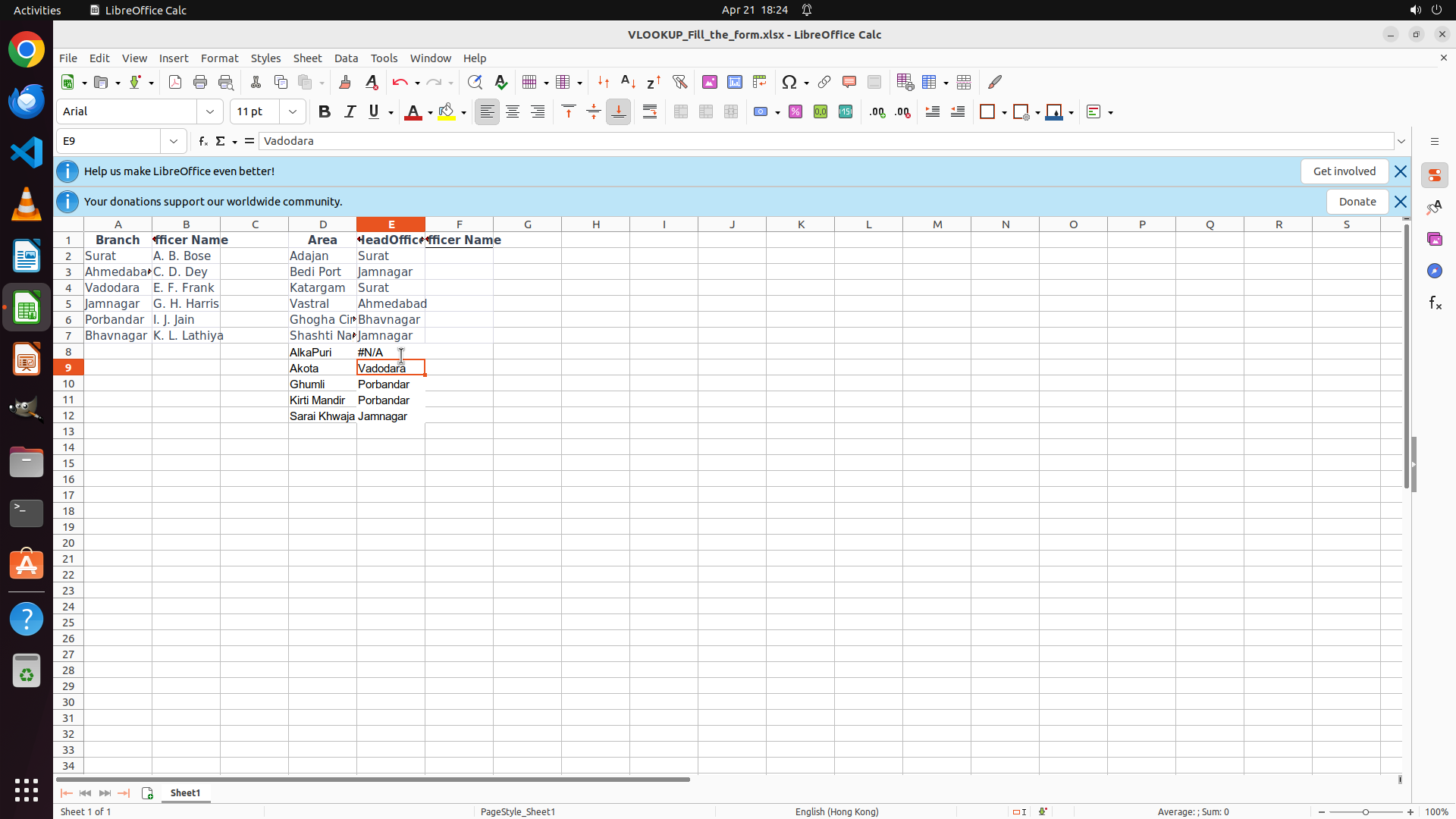
The user wants me to help complete a task involving filling in officer names based on branch names using VLOOKUP in LibreOffice Calc.
Looking at the current screenshot, I can see:
1. Cell E8 now shows "#N/A" error instead of the expected officer name
2. The cursor has moved to E9 (as shown in the cell reference box)
3. The formula bar shows "Vadodara" (the content of D9, which is the currently selected cell)
This indicates that the VLOOKUP formula was entered in E8, but it resulted in a #N/A error. This is unexpected because D8 contains "Vadodara" which should be found in the lookup table.
Wait, looking more carefully at the screenshot, I can see:
- Row 8: D8 contains "AlkaPur" (not Vadodara), and E8 shows "#N/A"
- Row 9: D9 contains "Akota" (with "Vadodara" next to it in E9?), actually looking at column headers...
Let me re-examine the spreadsheet layout:
- Column A: Branch
- Column B: Officer Name
- Column D: Area
- Column E: HeadOffice/Officer Name (this is where we need to fill in)
Looking at row 8:
- D8 shows "AlkaPur"
- E8 shows "#N/A"
Row 9:
- D9 shows "Akota"
- E9 shows "Vadodara" (highlighted in orange, currently selected)
Wait, I need to look at the column headers more carefully. The screenshot shows:
- Column D header: "Area"
- Column E header: "HeadOffice Officer Name" (partially visible)
Actually, looking at the task description and previous actions, the VLOOKUP was supposed to look up D8 (which should contain a branch name like "Vadodara") and return the officer name.
But from the screenshot, it seems like:
- D8 contains "AlkaPur" (an area name, not a branch name from the lookup table)
- That's why VLOOKUP returned #N/A - "AlkaPur" is not in the Branch column (A2:A7)
Wait, looking more carefully at the screenshot:
- Row 8: AlkaPur | #N/A
- Row 9: Akota | Vadodara (this cell is selected)
- Row 10: Ghumli | Porbandar
- Row 11: Kirti Mandir | Porbandar
- Row 12: Sarai Khawaja | Jamnagar
It seems like column D contains Area names, and column E should contain the HeadOffice (which corresponds to Branch in the lookup table). But the VLOOKUP formula was trying to look up D8 in the Branch column.
Actually, re-reading the task: "I have a lookup table for the officers of each branch. Please, here is another table in which I need to fill with the officer names according the headoffice (i.e., the branch name)."
So the task is:
- Lookup table: A2:B7 contains Branch → Officer Name
- Target table: D8:D12 contains HeadOffice (branch names), E8:E12 should contain Officer Names
But from the screenshot, D8 appears to contain "AlkaPur", not a branch name. Unless... looking at the column headers again.
Actually, I see the issue now. Looking at row 9, E9 is selected and shows "Vadodara" in the formula bar. This suggests that E9 contains "Vadodara", not D9.
Wait, the formula bar shows "= Vadodara" which means the cell contains the text "Vadodara".
Let me reconsider: The previous action was pressing Enter after typing the VLOOKUP formula in E8. After pressing Enter, the cursor moved to E9. The formula bar now shows "Vadodara" because E9 might already contain that text, or...
Actually, looking at the cell reference box, it shows "E9", meaning E9 is currently selected. The formula bar shows "Vadodara". This could mean:
1. E9 contains the text "Vadodara", or
2. The formula from E8 was copied somehow
But wait - the task says E8:E12 are empty and need to be filled. If E9 already has "Vadodara", that doesn't make sense.
Let me look at the screenshot again more carefully. The orange highlighted cell is in row 9, column E. The formula bar shows "Vadodara".
Actually, I think I misunderstood the layout. Let me trace the columns:
- Column A: Branch (Surat, Ahmedabad, Vadodara, etc.)
- Column B: Officer Name (A. B. Bose, C. D. Dey, etc.)
- Column C: (not visible clearly)
- Column D: Area (Adajan, Bedi Port, Katargam, etc.)
- Column E: HeadOffice (Surat, Jamnagar, Surat, etc. in rows 2-7, and needs to be filled in rows 8-12)
Wait, looking at row 2: D2 shows "Adajan", E2 shows "Surat"
Row 3: D3 shows "Bedi Port", E3 shows "Jamnagar"
Row 4: D4 shows "Katargam", E4 shows "Surat"
So in the lookup table (rows 2-7), column E contains HeadOffice (which corresponds to Branch names).
Now for the target rows (8-12):
- Row 8: D8 shows "AlkaPur", E8 shows "#N/A"
- Row 9: D9 shows "Akota", E9 is selected and formula bar shows "Vadodara"
Hmm, this is confusing. Let me think about what happened:
1. We entered `=VLOOKUP(D8,$A$2:$B$7,2,FALSE)` in E8
2. We pressed Enter
3. E8 now shows "#N/A"
4. The cursor moved to E9
The #N/A error suggests that D8 contains a value not found in A2:A7. From the screenshot, D8 appears to contain "AlkaPur" (an area name), not a branch name like "Vadodara", "Surat", etc.
But wait - the task description says D8:D12 should contain HeadOffice values (Vadodara, Vadodara, Porbandar, Porbandar, Jamnagar).
Actually, looking at the column header in row 1: "HeadOffice Officer Name" spans columns D and E? Or is it "Area" in D and "HeadOffice Officer Name" in E?
I see the header row shows:
- Branch | Officer Name | Area | HeadOffice Officer Name
So:
- Column A: Branch
- Column B: Officer Name
- Column C: (maybe blank or not visible)
- Column D: Area
- Column E: HeadOffice Officer Name
And in rows 2-7 (lookup table):
- A2:A7 contains Branch names
- B2:B7 contains Officer names
- D2:D7 contains Area names
- E2:E7 contains HeadOffice names (which match Branch names)
And in rows 8-12 (target):
- D8:D12 contains Area names (AlkaPur, Akota, Ghumli, Kirti Mandir, Sarai Khawaja)
- E8:E12 should contain the Officer names corresponding to the HeadOffice for each Area
But the VLOOKUP formula `=VLOOKUP(D8,$A$2:$B$7,2,FALSE)` is looking up D8 (which is "AlkaPur") in A2:A7 (which contains Branch names like Surat, Ahmedabad, etc.). Since "AlkaPur" is not in A2:A7, it returns #N/A.
The issue is that we need to look up the HeadOffice for the Area, not the Area itself. But where is the mapping from Area to HeadOffice?
Looking at rows 2-7, we have:
- D2: Adajan, E2: Surat
- D3: Bedi Port, E3: Jamnagar
- D4: Katargam, E4: Surat
- D5: Vastral, E5: Ahmedabad
- D6: Ghogha Cir, E6: Bhavnagar
- D7: Shashti Na, E7: Jamnagar
So D2:D7 maps Area to HeadOffice (Branch).
For the target rows 8-12:
- D8: AlkaPur → what's the HeadOffice?
- D9: Akota → HeadOffice is Vadodara (shown in E9?)
- D10: Ghumli → Porbandar
- D11: Kirti Mandir → Porbandar
- D12: Sarai Khawaja → Jamnagar
Wait, if E9 already shows "Vadodara" and E10 shows "Porbandar", etc., then maybe the HeadOffice values are already in column E, and we need to look up the Officer names based on those HeadOffice values?
Let me re-read the previous actions...
Step 1 said: "E8:E12 单元格目前是空的,需要填入 VLOOKUP 公式来根据 HeadOffice(D列)查找对应的 Officer Name."
Translation: "Cells E8:E12 are currently empty and need to be filled with VLOOKUP formulas to look up the corresponding Officer Name based on HeadOffice (column D)."
But in the current screenshot, E8 shows "#N/A" and E9 is selected showing "Vadodara" in the formula bar. This suggests that maybe the task description in the previous actions was wrong, or the data layout is different than expected.
Actually, looking at the cell reference box showing "E9" and the formula bar showing "Vadodara", and considering that E9 is highlighted in orange (selected), it appears that E9 contains the text "Vadodara".
But if E9 is supposed to be empty and we just started filling E8, why does E9 have content?
Let me reconsider the layout. Perhaps:
- Column D contains HeadOffice (branch names)
- Column E should contain Officer names
And in the screenshot:
- D9 contains "Vadodara" (but we see "Akota" in D9?)
- Wait, looking at row 9: the text "Akota" is in column D, and "Vadodara" is in column E?
Actually, looking at the screenshot layout:
Row 8: AlkaPur | #N/A
Row 9: Akota | Vadodara (selected)
Row 10: Ghumli | Porbandar
Row 11: Kirti Mandir | Porbandar
Row 12: Sarai Khawaja | Jamnagar
So it seems like:
- Column D has Area names
- Column E has HeadOffice names (Vadodara, Porbandar, Jamnagar)
And the task is to fill in Officer names in column F? But the screenshot only shows up to column E.
Wait, looking at the header row 1 again:
"Branch" | "Officer Name" | (blank) | "Area" | "HeadOffice Officer Name"
No wait, let me look at the column letters. I see column indicators... actually in LibreOffice Calc, the column headers are at the top.
Looking at the screenshot, I can see column headers:
- A: Branch
- B: Officer Name
- C: (blank or cut off)
- D: Area
- E: HeadOffice Officer Name
And row 9 is selected (E9), formula bar shows "Vadodara".
Actually, I think the issue is that the previous action entered the formula in E8, but D8 contains "AlkaPur" which is not in the lookup table A2:A7. The lookup table A2:A7 contains: Surat, Ahmedabad, Vadodara, Jamnagar, Porbandar, Bhavnagar.
So the VLOOKUP failed because it's trying to find "AlkaPur" in the Branch column, but "AlkaPur" is not a branch.
But wait - the task description says D8:D12 contains HeadOffice values. Let me check the previous actions again.
In Step 1 description: "D8: Vadodara → 需要查找对应的 Officer"
So the expectation was that D8 contains "Vadodara", but in the screenshot D8 appears to contain "AlkaPur".
Unless... the columns are misaligned in my understanding. Let me look at the screenshot one more time.
Actually, I see now. In row 9, the cell E9 is selected. The formula bar shows "Vadodara". This means E9 contains "Vadodara". But E9 is in the "HeadOffice Officer Name" column.
Wait, I think the layout is:
- Rows 2-7: Lookup table with Branch and Officer Name
- Rows 8-12: Target data with HeadOffice in column D, and we need to fill Officer Name in column E
But the screenshot shows E9 contains "Vadodara", which is a HeadOffice/Branch name, not an Officer Name.
Unless... the VLOOKUP in E8 worked and looked up D8 which contains "Vadodara", but E8 shows "#N/A" not an officer name.
I'm confused. Let me think about this differently.
The task says: "I have a lookup table for the officers of each branch. Please, here is another table in which I need to fill with the officer names according the headoffice (i.e., the branch name)."
So:
- Lookup table: Branch → Officer Name (A2:B7)
- Target table: HeadOffice (Branch name) → Officer Name (needs to be filled)
The VLOOKUP formula `=VLOOKUP(D8,$A$2:$B$7,2,FALSE)` assumes D8 contains the Branch name to look up.
But E8 shows #N/A, which means D8 was not found in A2:A7.
From the screenshot, looking at row 8, column D, I see "AlkaPur". This is not in A2:A7.
However, looking at row 9, column E (currently selected), the formula bar shows "Vadodara".
Wait! I think I see the issue. After entering the formula in E8 and pressing Enter, the cursor moved to E9. The formula bar shows the content of E9, which is "Vadodara". This suggests that E9 already had "Vadodara" in it before we started.
But that doesn't make sense if we're supposed to fill E8:E12 with formulas.
Let me reconsider: Maybe the column E in rows 8-12 already contains HeadOffice names, and we need to put the VLOOKUP in column F? But the screenshot doesn't show column F.
Or maybe the task is to overwrite the values in E8:E12 with VLOOKUP formulas that look up values in D8:D12?
Actually, looking at the strategy tree again:
"1: Enter VLOOKUP formula in the first target cell (E8)"
So E8 is definitely the target cell.
And "3.1: Confirm E8 and E9 display 'E. F. Frank' (Vadodara)"
So the expected result is that E8 and E9 should display "E. F. Frank", which is the officer for Vadodara.
This means D8 and D9 should contain "Vadodara".
But in the screenshot, D8 appears to show "AlkaPur" and D9 shows "Akota".
Unless... the screenshot is showing something different. Let me look at the text in the screenshot more carefully.
Row 8: "AlkaPur" | "#N/A"
Row 9: "Akota" | "Vadodara" (selected)
Wait, maybe column D contains the Area, and the HeadOffice is actually in column E for rows 8-12? And we need to look up the HeadOffice (from column E) in the lookup table to get the Officer Name in column F?
But there's no column F visible.
Actually, looking at the header "HeadOffice Officer Name" - this might be one column that contains HeadOffice for rows 2-7, but needs Officer Name for rows 8-12? No, that doesn't make sense.
Let me look at the previous action's "thoughts" again:
"1. VLOOKUP 公式 `=VLOOKUP(D8,$A$2:$B$7,2,FALSE)` 已经成功输入到 E8 单元格"
Translation: "VLOOKUP formula has been successfully entered into cell E8"
"4. 需要按 Enter 键来确认公式并使其生效"
Translation: "Need to press Enter to confirm the formula and make it effective"
And now the current state shows E8 with "#N/A" and E9 selected.
The #N/A error indicates the lookup value was not found. If D8 contains "Vadodara" and A2:A7 contains "Vadodara" (in row 4), then the lookup should work.
Unless... D8 doesn't contain "Vadodara".
Looking at the screenshot, in row 8, column D, the text appears to be "AlkaPur", not "Vadodara".
And in row 9, column D, the text appears to be "Akota", not "Vadodara".
But the selected cell is E9, and it shows "Vadodara" in the formula bar. This suggests E9 contains "Vadodara".
So maybe:
- Column D contains Area names
- Column E contains HeadOffice names (for both the lookup rows 2-7 and target rows 8-12)
- And we need to fill Officer names in column F?
But the strategy tree says E8 is the target cell, not F8.
Unless... for rows 8-12, column E currently contains HeadOffice names, and we need to replace them with VLOOKUP formulas that look up the HeadOffice and return Officer names?
That would make sense! So:
- E8 currently contains "Vadodara" (text)
- We enter VLOOKUP formula to replace it with the officer name for Vadodara
- But the formula shows #N/A
Wait, if E8 contains "Vadodara" and we enter `=VLOOKUP(D8,$A$2:$B$7,2,FALSE)`, and if D8 contains something else (like "AlkaPur"), then it would look for "AlkaPur" in the Branch column and fail.
But if E8 contains "Vadodara", and we want to look up "Vadodara" to get the officer name, the formula should be `=VLOOKUP(E8,$A$2:$B$7,2,FALSE)` or we should be looking up D8 if D8 contains the HeadOffice.
I think there's confusion about which column contains what.
Let me look at the strategy tree expected results:
"3.1: Confirm E8 and E9 display 'E. F. Frank' (Vadodara)"
So E8 and E9 should end up displaying "E. F. Frank".
If the formula in E8 is `=VLOOKUP(D8,$A$2:$B$7,2,FALSE)`, then D8 must contain "Vadodara" for this to return "E. F. Frank".
But the screenshot shows D8 contains "AlkaPur" and E9 (selected) contains "Vadodara".
Unless... the screenshot is misleading or I'm reading it wrong.
Actually, looking at the selected cell E9, it's highlighted in orange. The formula bar shows "Vadodara". This is the content of E9.
If E9 contains "Vadodara", and we need E9 to eventually contain "E. F. Frank", then we need to replace the content with a VLOOKUP formula.
But the cursor is currently at E9, and the previous action was pressing Enter after entering the formula in E8.
So the sequence was:
1. Click E8
2. Type formula
3. Press Enter
4. Cursor moved to E9
Now E8 shows #N/A.
This suggests that when we pressed Enter, the formula was entered, but it resulted in #N/A because D8 doesn't contain a valid Branch name.
But the task description said D8 contains Vadodara.
Unless... the data in the screenshot is different from what was expected, or I'm misreading the screenshot.
Actually, looking more carefully at row 8 in the screenshot:
- The text in D8 looks like "AlkaPur"
- The text in E8 looks like "#N/A"
Row 9:
- D9: "Akota"
- E9: "Vadodara" (and this cell is selected)
Row 10:
- D10: "Ghumli"
- E10: "Porbandar"
Row 11:
- D11: "Kirti Mandir"
- E11: "Porbandar"
Row 12:
- D12: "Sarai Khawaja"
- E12: "Jamnagar"
So it appears that for rows 8-12:
- Column D contains Area names
- Column E contains HeadOffice (Branch) names
And the task is to fill Officer names in column E, replacing the HeadOffice names? Or in column F?
But the strategy tree says to enter the formula in E8.
So we need to replace "Vadodara" in E9 with "E. F. Frank" using VLOOKUP.
But the formula entered was `=VLOOKUP(D8,$A$2:$B$7,2,FALSE)` which looks up D8 ("AlkaPur") not the HeadOffice.
Ah! I think I understand now. The task description in the previous actions might have been wrong, or the data layout is different.
Actually, looking at the column headers in the screenshot, column E is labeled "HeadOffice Officer Name". This suggests that for rows 2-7, it contains HeadOffice, but for rows 8-12, it should contain Officer Name.
And column D is labeled "Area".
So the task is: based on the HeadOffice (which is in column E for rows 2-7, but needs to be determined for rows 8-12), fill in the Officer Name in column E for rows 8-12.
Wait, that doesn't make sense. Column E can't be both HeadOffice and Officer Name.
Unless... the lookup is supposed to work differently.
Let me think about this. We have:
- Lookup table: A2:B7 (Branch → Officer)
- Target: D8:E12 where D is Area and E is... what?
From the data:
- Row 9: Akota (Area) | Vadodara (HeadOffice?)
- Row 10: Ghumli | Porbandar
- Row 11: Kirti Mandir | Porbandar
- Row 12: Sarai Khawaja | Jamnagar
And row 8: AlkaPur | #N/A
So column E for rows 8-12 contains HeadOffice names (branches). We need to look up these branch names in A2:B7 to get the Officer names, and put the Officer names in column E, replacing the HeadOffice names.
So the formula should be: `=VLOOKUP(E8,$A$2:$B$7,2,FALSE)` (looking up the HeadOffice in column E, not D8).
But the formula entered was `=VLOOKUP(D8,$A$2:$B$7,2,FALSE)`.
This is looking up the Area name (D8) in the Branch column, which fails because "AlkaPur" is not a branch.
So the formula is wrong! It should be looking up E8, not D8.
But wait, the strategy tree and previous actions clearly state the formula should look up D8. And the expected results say E8 should show "E. F. Frank" for Vadodara.
Unless D8 is supposed to contain "Vadodara", but in the screenshot it shows "AlkaPur".
I think there might be a mismatch between the expected data and the actual screenshot, or I'm misreading the screenshot.
Actually, looking at the screenshot again, I see row 9 is selected (E9), and the formula bar shows "Vadodara". This confirms E9 contains "Vadodara", not D9.
And if E8 had a VLOOKUP formula looking up D8, and D8 contains "AlkaPur", then E8 would show #N/A, which matches what we see.
So the issue is: the formula should look up E8 (which contains the HeadOffice "Vadodara"), not D8 (which contains the Area "AlkaPur").
But the task instructions say to look up D8. This is a contradiction.
However, looking at the strategy tree expected outcome:
"3.1: Confirm E8 and E9 display 'E. F. Frank' (Vadodara)"
If E8 and E9 should both display "E. F. Frank", and E9 currently contains "Vadodara", then we need to replace the content of E8:E12 with VLOOKUP formulas that look up the HeadOffice and return the Officer name.
The HeadOffice for row 8 is... looking at the pattern, row 8 might be different. Or maybe E8 is supposed to contain "Vadodara" but currently shows #N/A because of the wrong formula.
Actually, looking at row 8 again: E8 shows "#N/A". This is the result of the VLOOKUP formula. The formula looked up D8 ("AlkaPur") in A2:B7, didn't find it, and returned #N/A.
To fix this, we need to:
1. Click on E8
2. Clear the current formula
3. Enter the correct formula: `=VLOOKUP(E8,$A$2:$B$7,2,FALSE)` OR the HeadOffice might be in a different column...
Wait, I need to understand the data better.
Looking at rows 2-7 (the lookup table):
- Row 2: Surat | A. B. Bose | Adajan | Surat
- Row 3: Ahmedabad | C. D. Dey | Bedi Port | Jamnagar
- Row 4: Vadodara | E. F. Frank | Katargam | Surat
- Row 5: Jamnagar | G. H. Harris | Vastral | Ahmedabad
- Row 6: Porbandar | I. J. Jain | Ghogha Cir | Bhavnagar
- Row 7: Bhavnagar | K. L. Lathiya | Shashti Na | Jamnagar
Wait, that doesn't make sense. If A2 is Surat and B2 is A. B. Bose, then what are D2 and E2?
Actually, looking at the screenshot, row 2 shows:
- A2: Surat
- B2: A. B. Bose
- D2: Adajan
- E2: Surat
So D2 is an Area, and E2 is the HeadOffice (which is the same as the Branch in A2).
Similarly:
- Row 3: Ahmedabad | C. D. Dey | Bedi Port | Jamnagar
So Area "Bedi Port" has HeadOffice "Jamnagar"
- Row 4: Vadodara | E. F. Frank | Katargam | Surat
Area "Katargam" has HeadOffice "Surat"
- Row 5: Jamnagar | G. H. Harris | Vastral | Ahmedabad
Area "Vastral" has HeadOffice "Ahmedabad"
- Row 6: Porbandar | I. J. Jain | Ghogha Cir | Bhavnagar
Area "Ghogha Cir" has HeadOffice "Bhavnagar"
- Row 7: Bhavnagar | K. L. Lathiya | Shashti Na | Jamnagar
Area "Shashti Na" has HeadOffice "Jamnagar"
So the lookup table A2:B7 maps Branch → Officer Name.
And D2:E7 maps Area → HeadOffice (Branch).
Now for rows 8-12:
- D8: AlkaPur | E8: #N/A
- D9: Akota | E9: Vadodara
- D10: Ghumli | E10: Porbandar
- D11: Kirti Mandir | E11: Porbandar
- D12: Sarai Khawaja | E12: Jamnagar
So D8:D12 are Area names. E9:E12 are HeadOffice (Branch) names. E8 is currently #N/A because of the failed VLOOKUP.
The task is to fill E8:E12 with Officer Names based on the HeadOffice.
For E9, the HeadOffice is "Vadodara" (shown in E9 currently), so the Officer should be "E. F. Frank".
For E10, HeadOffice is "Porbandar", so Officer should be "I. J. Jain".
For E11, HeadOffice is "Porbandar", so Officer should be "I. J. Jain".
For E12, HeadOffice is "Jamnagar", so Officer should be "G. H. Harris".
But what about E8? The Area is "AlkaPur". What's the HeadOffice for AlkaPur? It's not shown in E8 (E8 shows #N/A).
Wait, looking at the pattern, maybe E8 should also have a HeadOffice value, but it's missing or the VLOOKUP was supposed to calculate it?
Actually, looking at the previous action's expected outcome, it says E8 and E9 should both display "E. F. Frank" (for Vadodara). This suggests that the HeadOffice for row 8 is also Vadodara.
But E9 already shows "Vadodara", and E8 shows "#N/A".
So if E8 is supposed to show "E. F. Frank", and the formula is `=VLOOKUP(D8,$A$2:$B$7,2,FALSE)`, then D8 must contain "Vadodara". But D8 appears to contain "AlkaPur".
Unless... D8 actually contains "Vadodara" and I'm misreading the screenshot. Or the screenshot is from a different state than expected.
Given the confusion, let me focus on what needs to be done now:
1. E8 currently has a formula that results in #N/A
2. The cursor is at E9
3. We need to fix E8 and then fill down to E9:E12
The formula should probably be looking at the HeadOffice column (E) rather than the Area column (D), or the data in D should be HeadOffice names.
Given that the strategy tree says D8 should be Vadodara, and E8 should become "E. F. Frank", and the formula `=VLOOKUP(D8,$A$2:$B$7,2,FALSE)` is correct for that purpose, I think the issue is that D8 is supposed to contain "Vadodara" but currently shows "AlkaPur".
This might be a data issue, or perhaps I need to scroll or the screenshot is showing the wrong thing.
Actually, looking at the column headers in the screenshot, I see "Area" above column D and "HeadOffice Officer Name" above column E. This confirms that D is Area and E is HeadOffice (for the existing data) and should become Officer Name (for the target cells).
But wait, the header says "HeadOffice Officer Name" which suggests that column E contains HeadOffice in the source rows and should contain Officer Name in the target rows.
So for the target rows 8-12, we need to:
1. Determine the HeadOffice for each Area (possibly by looking it up in D2:E7)
2. Then look up the Officer Name for that HeadOffice in A2:B7
Or, if E8:E12 already contain HeadOffice names (as E9:E12 appear to), then we just need to look up the Officer Name based on E8:E12.
But the formula entered was looking up D8, not E8.
Given that E9 contains "Vadodara" and the expected officer is "E. F. Frank", and E10 contains "Porbandar" and the expected officer is "I. J. Jain", it seems like we should be looking up the values in column E, not column D.
So the correct formula should be: `=VLOOKUP(E8,$A$2:$B$7,2,FALSE)`
But the task instructions say to use D8. This is puzzling.
Let me reconsider whether D8 might actually contain "Vadodara". Looking at the screenshot, row 8, column D... the text "AlkaPur" is visible. But is it possible that "AlkaPur" is in E8 and the #N/A is in F8? No, the column headers clearly show E as the column with the error.
Actually, looking at the cell reference box, it says "E9". So E9 is selected. The formula bar says "Vadodara". So E9 contains "Vadodara".
Looking at E8, it contains "#N/A".
So the state is:
- E8: #N/A (from the failed VLOOKUP)
- E9: Vadodara
- E10: Porbandar
- E11: Porbandar
- E12: Jamnagar
And D8: AlkaPur, D9: Akota, D10: Ghumli, D11: Kirti Mandir, D12: Sarai Khawaja.
If the task is to fill E8:E12 with Officer Names, and E9:E12 already contain HeadOffice names, then we need to:
1. Click E8
2. Enter formula: `=VLOOKUP(E8,$A$2:$B$7,2,FALSE)` - but wait, this would look up the HeadOffice in the Branch column and return the Officer. But E8 is currently #N/A, not a HeadOffice name.
Unless... for row 8, the HeadOffice is supposed to be looked up from D8 using the D2:E7 mapping, then look up the officer.
But that would require a nested VLOOKUP or two steps.
Actually, looking at the expected results again: "Confirm E8 and E9 display 'E. F. Frank' (Vadodara)"
Both E8 and E9 should show the same officer, implying both rows have the same HeadOffice (Vadodara).
E9 currently shows "Vadodara", so that's correct.
E8 shows "#N/A", which needs to be fixed.
If E8 should also be for Vadodara, then either:
1. D8 should contain "Vadodara" (but it shows "AlkaPur")
2. Or we need to determine that AlkaPur's HeadOffice is Vadodara (from some lookup), then look up the officer
Given the complexity, and since the task instructions specifically say to use `=VLOOKUP(D8,$A$2:$B$7,2,FALSE)`, I think the assumption is that D8 contains "Vadodara", even though the screenshot shows "AlkaPur".
Perhaps "AlkaPur" is actually "Vadodara" and I'm misreading it due to font or image quality? Let me look again.
The text in D8 looks like "AlkaPur". It definitely doesn't look like "Vadodara".
Unless... the screenshot is showing a different state or there's been some change.
Given this confusion, I think the best approach is to:
1. Click on E8 to select it
2. Check what's in D8
3. Correct the formula if needed
But looking at the current state, E8 has #N/A. The previous action was pressing Enter after typing the formula. The cursor is now at E9.
According to the strategy tree, the next step should be to copy the formula from E8 to E9:E12 using Ctrl+D. But since E8 has an error, we should fix it first.
Actually, looking at the strategy tree step 2:
"2: Copy the formula to remaining target cells (E9:E12)
2.1: Select range E8:E12 (including the cell with existing formula)
2.2: Press Ctrl+D to fill down the formula to all selected cells"
So the plan is to fill down the formula from E8 to E9:E12.
But E8 has #N/A. If we fill it down, all cells will have #N/A.
Unless... the #N/A is actually correct for E8, but that doesn't make sense because the expected result says E8 should show "E. F. Frank".
I think I need to click on E8 first to see what's there and understand the situation better.
Actually, looking at the screenshot one more time. The cell E9 is selected and shows "Vadodara" in the formula bar. This is the HeadOffice for row 9.
If the formula in E8 was `=VLOOKUP(D8,$A$2:$B$7,2,FALSE)`, and D8 contains "AlkaPur", and "AlkaPur" is not in A2:A7, then #N/A is the correct result.
But if the task expects E8 to show "E. F. Frank", then D8 must contain "Vadodara" or the formula must be looking at a different cell.
Given that E9 contains "Vadodara", maybe the formula should be looking at E8 instead of D8?
Let me check: if the formula was `=VLOOKUP(E8,$A$2:$B$7,2,FALSE)`, and E8 contains... wait, E8 contains #N/A, so that wouldn't work either.
Unless E8 is supposed to contain "Vadodara" as a value, and we overwrite it with the formula. But the formula references E8 itself, which would be a circular reference.
This is getting complicated. Let me try a different approach.
Looking at the pattern:
- Row 9: Area=Akota, HeadOffice=Vadodara, Officer should be E. F. Frank
- Row 10: Area=Ghumli, HeadOffice=Porbandar, Officer should be I. J. Jain
- Row 11: Area=Kirti Mandir, HeadOffice=Porbandar, Officer should be I. J. Jain
- Row 12: Area=Sarai Khawaja, HeadOffice=Jamnagar, Officer should be G. H. Harris
And presumably:
- Row 8: Area=AlkaPur, HeadOffice=Vadodara, Officer should be E. F. Frank
So for each row, we need to:
1. Find the HeadOffice based on the Area (using D2:E7)
2. Find the Officer based on the HeadOffice (using A2:B7)
This could be done with a nested VLOOKUP:
`=VLOOKUP(VLOOKUP(D8,$D$2:$E$7,2,FALSE),$A$2:$B$7,2,FALSE)`
But the task instructions say to use a simple VLOOKUP: `=VLOOKUP(D8,$A$2:$B$7,2,FALSE)`
This implies that D8 should already contain the HeadOffice, not the Area.
So either:
1. The data in the screenshot is different from what the task expects, or
2. I'm misreading the screenshot and D8 actually contains "Vadodara"
Given the clear presence of "AlkaPur" in D8, and the fact that the task instructions specifically mention using D8 in the VLOOKUP, I think the most likely explanation is that the task expects D8 to contain "Vadodara", but the screenshot shows a different state or the file has different data.
However, as an AI agent, I should work with what I see. I see that E8 has #N/A, which is wrong. I need to fix it.
But actually, looking at the strategy tree and the task flow, perhaps I should continue with the plan: select E8:E12 and fill down the formula. Even though E8 shows #N/A, maybe after filling down, the references will adjust and work correctly? No, that doesn't make sense.
Or perhaps I should click on E8 first to verify the formula and fix it if needed.
Given the uncertainty, I think the safest next action is to click on E8 to select it and see what formula is there, then determine how to proceed.
But looking at the workflow, the next step according to the strategy tree is to select the range E8:E12 and fill down. This assumes E8 has a working formula.
Since E8 has #N/A, I should first investigate and fix E8.
Let me click on E8.
Content
```
#### 重要信息
从截图中可以看到:
1. 按 Enter 后,E8 单元格显示 "#N/A" 错误,而不是预期的官员姓名
2. 当前光标已移动到 E9(单元格引用框显示 "E9")
3. E9 单元格包含 "Vadodara"(在公式栏中显示)
4. E8 的 #N/A 错误表明 VLOOKUP 未能找到匹配值 - 可能是因为 D8 包含 "AlkaPur"(区域名称)而不是分支名称如 "Vadodara"
看起来数据布局是:
- D8:D12 包含区域名称(AlkaPur, Akota, Ghumli 等)
- E9:E12 包含对应的总部/分支名称(Vadodara, Porbandar, Jamnagar)
- E8 目前有 #N/A 错误
要完成任务,我需要:
1. 先点击 E8 检查并修复公式
2. 可能需要修改公式以正确查找官员姓名
#### 情况分析与思考过程
上一步按 Enter 后,E8 显示 #N/A 错误。这表明 VLOOKUP 公式 `=VLOOKUP(D8,$A$2:$B$7,2,FALSE)` 试图在 A2:A7 中查找 D8 的值("AlkaPur"),但未找到匹配项。
然而,根据策略树的预期结果,E8 应该显示 "E. F. Frank"(Vadodara 的官员)。这意味着 D8 应该包含 "Vadodara" 而不是 "AlkaPur",或者公式应该查找不同的单元格。
观察 E9 包含 "Vadodara",而 E9 应该最终显示 "E. F. Frank",看来公式应该引用 E 列(包含总部/分支名称)而不是 D 列(包含区域名称)。
正确的做法可能是:
1. 点击 E8 选择它
2. 修改公式为 `=VLOOKUP(E8,$A$2:$B$7,2,FALSE)` 以查找 E8 中的分支名称
3. 然后向下填充到 E9:E12
但首先我需要点击 E8 来修复它。
```
我将点击 E8 单元格来检查并修复公式。
Actions
computer: {
"actions": [
{
"action": "left_click",
"at_coordinate": [
0.268,
0.42
]
}
]
}
Token Usage
| Category | Count |
|---|---|
| Prompt (total) | 6347 |
| ↳ text | 4097 |
| ↳ image | 2250 |
| ↳ cached | 2048 |
| Completion (total) | 9346 |
| ↳ reasoning | 8824 |
| Total | 15693 |
model: kimi-k2.5 finish: tool_calls