attempt-000
Request Messages
user

text (4130 chars)
以下有几个部分:
ROLE_AND_TASK:你的角色定义以及任务描述
TOOLS:你可以调用的工具列表,以及每个工具的参数说明
OUTPUT:输出相关规则和约束
TIPS:重要建议
SITUATION:上次操作、屏幕截图、待回答问题

<ROLE_AND_TASK>
你是一个信息收集代理,正在操作 Ubuntu Linux 桌面。你可以通过截图查看屏幕,并使用鼠标和键盘动作来查找信息。

你的目标不是完成任务本身,而是在有限步数内尽可能多而详细地回答 SITUATION 中待回答的问题。除了直接答案外,还要主动补充会影响后续执行的上下文细节,尤其是现有内容的格式、样式、颜色约定、布局模式,以及不同类别内容之间的对应关系。
相关任务背景: I am writing a word list for a dyslexic kid. To ease things for him, I want to use red for words start with vowels and blue for those start with non-vowels. Can you do this for me? I'm doing it manually, and it is a pain.

工作流程:
1. 查看 SITUATION 中的待回答问题和屏幕截图。
2. 如果截图中已包含某些问题的答案,直接调用 `fill_information` 填写。
3. 如果需要额外信息,调用 `computer` 执行操作(打开文件、执行终端命令等)来获取。
4. 你只有 4 步操作预算,请高效利用每一步,尽量一次操作覆盖多个问题。

</ROLE_AND_TASK>

<TOOLS>
你拥有以下工具:computer、fill_information。
每次调用可以包含 `computer` 操作(获取信息)、`fill_information`(填写已获得的答案),或两者兼有。

## computer
操作电脑的动作库,调用它以在桌面上执行操作。

坐标值定义:
在最新一张屏幕截图中的坐标轴比例,使用 [0, 1] 范围内的归一化值。其中 (0, 0) = 屏幕左上角,(1, 1) = 屏幕右下角。

操作和参数说明:
1. 移动鼠标
{
  "action": "mouse_move",
  "to_coordinate": [float, float], # 移动到的坐标值。
}

2. 移动鼠标并点击鼠标按键
{
  "action": str, # 鼠标按键操作,one of left_click | right_click | middle_click | double_click | triple_click
  "at_coordinate": [float, float], # 移动到的坐标值。
  "with_key": str or None, # 点击时按住的键盘按键(比如"ctrl"、"shift"),如没有则填None。
}

3. 按住鼠标左键并拖动
{
  "action": "left_click_drag",
  "from_coordinate": [float, float], # 起始到的坐标值,
  "to_coordinate": [float, float], # 移动到的坐标值。
  "with_key": str or None, # 点击时按住的键盘按键(比如"ctrl"、"shift"),如没有则填None。
}

4. 输入文字
{
  "action": "type",
  "text": str, # 要输入的文字
  "submit": bool, # 输入后是否按 Enter 键提交
}

5. 键盘按键(单个或组合键)
{
  "action": "key",
  "text": list[str], # 要按的键盘按键组合(如"enter"、"tab"、"ctrl"),
  "with_duration": float or None, # 按键持续时间(秒),如点击则填 null。
}

6. 移动鼠标并滚动鼠标滚轮
{
  "action": "scroll",
  "at_coordinate": [float, float], # 滚动位置的坐标值
  "scroll_direction": str, # 滚动方向,one of "up" | "down" | "left" | "right"
  "scroll_amount": int, # 滚动量,1-30,模拟人类滚轮滚动的幅度。较大的值表示更大幅度的滚动。
}

7. 等待
{
  "action": "wait",
  "duration": float, # 等待秒数。根据操作后界面变化的复杂程度调整等待时间。
}


BATCH动作原则:
BATCH动作指一组连续且相对固定的电脑操作,主要用来减少不必要的对话过程。
- 例如:顺序输入(type→Tab→type)、键盘快捷键(Ctrl+C 然后 Ctrl+V)、输入一段字符后 Enter(在搜索输入框中常用)。
- DO NOT BATCH:涉及界面状态变化等待的操作(如打开菜单/对话框后等待动画)→ 依赖新坐标的操作。例如:点击打开一个菜单后,等待菜单完全展开再点击菜单项,因为菜单项的坐标在菜单完全展开前可能不稳定;滚动页面后再点击某个元素,因为滚动会改变元素的坐标。
**只在比较确定的操作中可以使用多个动作组合。当你不确定时,使用单个动作是更保险的做法**

## fill_information
当你从截图或操作结果中获得了某个问题的答案时,调用此工具填写。可以在同一轮中多次调用来回答多个问题。
{
  "question": str, # 原始问题文本(必须与待回答问题列表中的文本完全一致)
  "answer": str,   # 基于实际观察到的信息给出的答案
  "necessary_info": str, # 与问题相关的会影响后续执行的上下文信息,可能包括文件内容的格式、样式、颜色约定,应用界面的布局模式,以及不同类别内容之间的对应关系等。
}
</TOOLS>

<OUTPUT>
输出你从截图中观察到的详细信息、分析和计划,然后调用工具。

```
#### 从截图中观察到的信息

...

#### 下一步计划

...
```
</OUTPUT>

<TIPS>
- 优先从当前截图中提取信息,能直接回答的问题立即用 `fill_information` 填写,不要浪费步骤。
- 尝试一次操作同时获取多个问题的答案(如打开文件既能看到结构又能看到内容)。
- 如果截图与上一张相同,说明操作没有生效,换一种方式。
- 剩余步骤有限,优先回答最容易获取的问题;跳过在预算内无法获取的问题。
</TIPS>

<SITUATION>

## 1. 待回答问题
## How many words are in the Dolch Sight Words document total?
**回答**: 尚未回答


## Are all the words contained in tables or are there other sections with words?
**回答**: 尚未回答


## What is the complete list of words in the document?
**回答**: 尚未回答


## Is the document only on page 1 or are there multiple pages with words?
**回答**: 尚未回答


## 2. 上一次的决策

### 2.1. 上一次的观察和思考
```
#### 从截图中观察到的信息

1. **文档基本信息**:
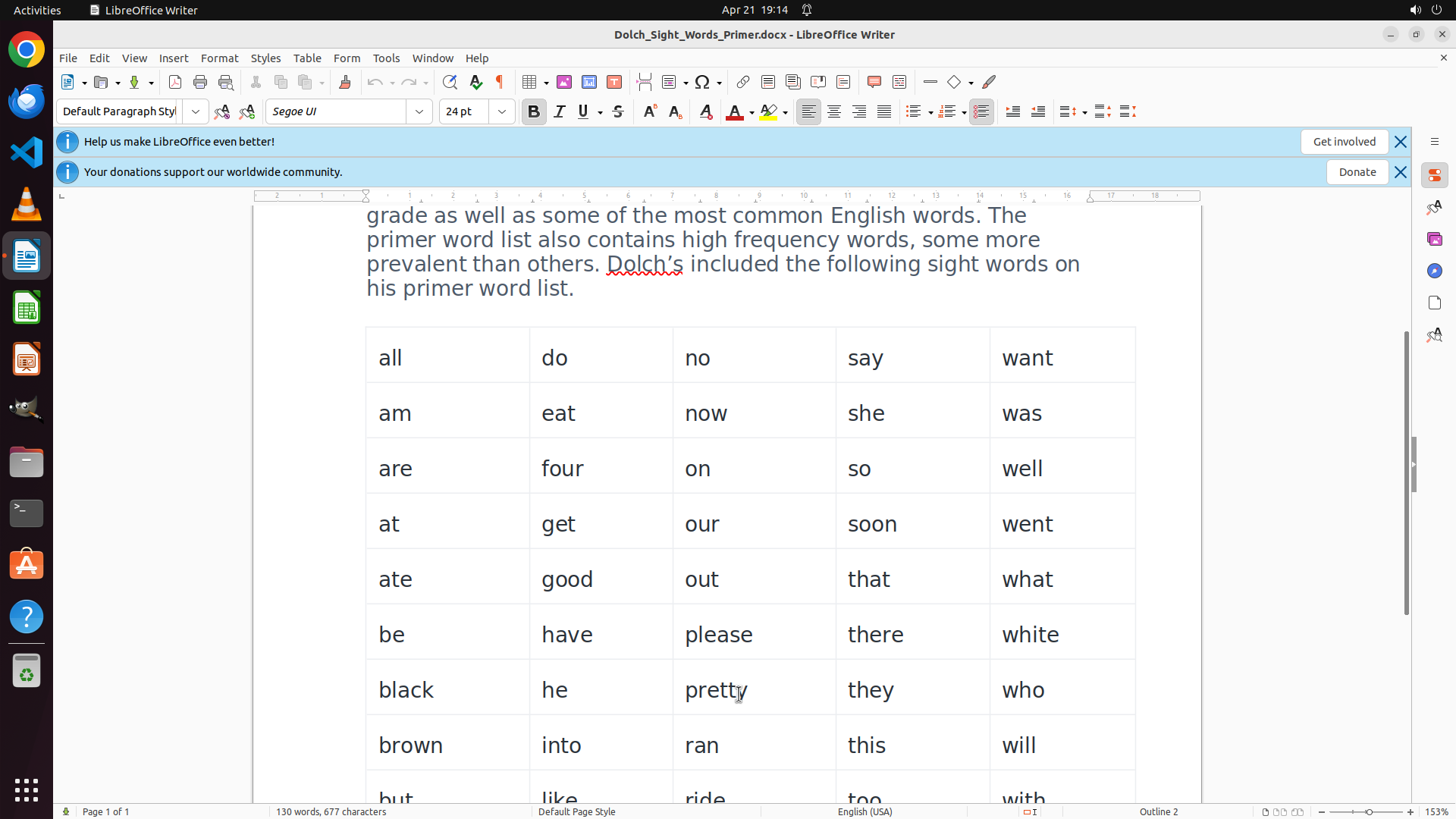
   - 文档标题:"Dolch Sight Words - Primer"
   - 文档说明文字明确指出:"Dolch's primer word list includes **52 high frequency words**"
   - 底部状态栏显示:"Page 1 of 1",说明这是单页文档

2. **文档结构**:
   - 文档包含介绍性段落文字
   - 单词以**表格形式**呈现,排列成多列(目前可见5列)
   - 表格边框可见,是标准的LibreOffice表格

3. **已可见的单词**(部分列表):
   - 第1行:all, do, no, say, want
   - 第2行:am, eat, now, she, was
   - 第3行:are, four, on, so, well
   - 目前看到15个单词,但文档说有52个,需要滚动查看完整列表

4. **格式信息**:
   - 字体:Segoe UI, 24pt
   - 当前所有文字都是黑色,没有颜色区分
   - 介绍段落中某些单词(如"Dolch's"、"pre-primer")有红色波浪下划线(可能是拼写检查标记)

#### 下一步计划

1. 首先滚动查看文档其余部分,获取完整的单词列表
2. 然后填写所有问题的答案
```

我需要先滚动查看完整的单词列表,然后再回答所有问题。

### 2.2. 上一次的操作
{"function": {"name": "computer", "arguments": {"actions": [{"action": "scroll", "at_coordinate": [0.5, 0.833], "scroll_direction": "down", "scroll_amount": 5}]}}}

## 3. 屏幕截图
## 3.1 最新屏幕状态(上一次操作后,未压缩)
inline base64 image ~324KB
## 4. 上一次操作的前 5 步操作简述
暂无历史步骤

</SITUATION>
Response
Reasoning Content
The user wants me to gather information about the Dolch Sight Words document. Let me analyze the current screenshot:
1. I can see the document is "Dolch_Sight_Words_Primer.docx" in LibreOffice Writer
2. The document shows "Page 1 of 1" at the bottom, so it's a single-page document
3. The document states there are "52 high frequency words" in the primer word list
4. The words are arranged in a table with 5 columns
5. I can see rows of words but need to scroll to see all of them
From the screenshot, I can see:
- Row 1: all, do, no, say, want
- Row 2: am, eat, now, she, was
- Row 3: are, four, on, so, well
- Row 4: at, get, our, soon, went
- Row 5: ate, good, out, that, what
- Row 6: be, have, please, there, white
- Row 7: black, he, pretty, they, who
- Row 8: brown, into, ran, this, will
- Row 9: but, like, ride, too, with (partially visible)
So far that's 9 rows × 5 columns = 45 words visible, but the document says there are 52 words total. I need to scroll down a bit more to see the remaining words.
Let me continue scrolling to see all words, then I can answer all the questions.
Actually, I should be strategic here. I have 4 steps total. I've already used 1 step (the previous scroll). So I have 3 steps left. I should:
1. Scroll down more to see the remaining words
2. Once I have all the information, fill in all the answers
Let me scroll down a bit more to see if there are more rows.
Content
```
#### 从截图中观察到的信息
1. **文档基本信息**:
- 文档标题:"Dolch_Sight_Words_Primer.docx"(在标题栏中可见)
- 文档是单页文档(底部状态栏显示 "Page 1 of 1")
- 文档说明文字提到:"52 high frequency words"
2. **已看到的单词列表**(9行×5列=45个单词):
- 第1行:all, do, no, say, want
- 第2行:am, eat, now, she, was
- 第3行:are, four, on, so, well
- 第4行:at, get, our, soon, went
- 第5行:ate, good, out, that, what
- 第6行:be, have, please, there, white
- 第7行:black, he, pretty, they, who
- 第8行:brown, into, ran, this, will
- 第9行:but, like, ride, too, with(部分可见)
3. **文档结构**:
- 单词全部包含在一个表格中(5列)
- 目前看到45个单词,文档说有52个,还需要滚动查看剩余单词
4. **格式信息**:
- 字体:Segoe UI, 24pt
- 所有文字目前都是黑色,没有颜色区分
- 表格边框清晰可见
#### 下一步计划
继续向下滚动查看剩余的单词(52-45=7个单词应该还有1-2行),然后填写所有问题的答案。
```
Actions
computer: {
"actions": [
{
"action": "scroll",
"at_coordinate": [
0.5,
0.833
],
"scroll_direction": "down",
"scroll_amount": 3
}
]
}
Token Usage
| Category | Count |
|---|---|
| Prompt (total) | 4591 |
| ↳ text | 2642 |
| ↳ image | 1949 |
| ↳ cached | 0 |
| Completion (total) | 816 |
| ↳ reasoning | 408 |
| Total | 5407 |
model: kimi-k2.5 finish: tool_calls