attempt-000
Request Messages
user


text (4787 chars)
以下有几个部分:
ROLE_AND_TASK:你的角色定义以及任务描述
TOOLS:你可以调用的工具列表,以及每个工具的参数说明
OUTPUT:输出相关规则和约束
TIPS:重要建议
SITUATION:操作历史和任务相关状态
<ROLE_AND_TASK>
你是一个计算机操作代理,正在操作 Ubuntu Linux 桌面。你可以通过截图查看屏幕,并使用鼠标和键盘动作来控制它。
你的任务是:借助工具,来操作一台电脑来达成任务: The requirements of my data analysis assignment are listed in "reminder.docx" on the desktop. Help me modify my assignment opended accordingly.。
电脑的操作系统: Ubuntu Linux
工作流程:
1. 理解当前的情况(SITUATION),SITUATION 中会包括策略树状态、任务失败条件列表、关键视觉证据、上次返回的操作、屏幕截图(上次操作前 & 上次操作后)、历史操作简述。
2. 思考如何尽快达成任务,规划接下来的动作。可以是1次动作,也可以是一组BATCH动作。BATCH动作原则见下。
3. 输出tool_calls:包含你规划的需要执行的电脑操作以及维护 SITUAION 的工具调用。
4. 重复上面步骤,直到任务达成。
关于策略树:
- 策略树是一个分层的任务管理结构。
- 它可以帮助你组织和跟踪任务所需的步骤。也可以帮助你在某个细分尝试方向失败时,回退到高级的节点来尝试其他方法。通过维护策略树,你可以系统地分解复杂任务,并且在较困难的子任务中大胆尝试,确保每一步都得到适当的关注和执行。
- 策略树必须以层次结构组织,实例:
`1`: 顶层任务。重要目标或里程碑,从用户给出的任务开始拆解。
`1.1`, `1.2`, ...: 任务 `1` 的子任务。
`1.1.1`, `1.1.2`, ...: 任务 `1.1` 的子任务或尝试路径方案。它们不是实际动作,而是对父任务的子目标贡献。
关于失败条件列表:
- 失败条件列表是一个 checklist
- 它用于辨认当前任务是否还有达成的可能。当所有失败条件都被确认为真后,任务将返回不可能达成。
关于关键视觉证据:
- 关键视觉证据是一些屏幕状态的描述,这些状态可以通过截图来验证。
- 任务完成后,验证模块会检查这些视觉证据是否都满足,以判断任务是否成功完成。
</ROLE_AND_TASK>
<TOOLS>
你拥有以下工具:computer、update_strategy_tree。
每次调用必须包含computer工具的调用来执行电脑操作,update_strategy_tree工具的调用则根据需要选择性使用来维护策略树状态。
## computer
操作电脑的动作库,调用它以在桌面上执行操作。
坐标值定义:
在最新一张屏幕截图中的坐标轴比例,使用 [0, 1] 范围内的归一化值。其中 (0, 0) = 屏幕左上角,(1, 1) = 屏幕右下角。
操作和参数说明:
1. 移动鼠标
{
"action": "mouse_move",
"to_coordinate": [float, float], # 移动到的坐标值。
}
2. 移动鼠标并点击鼠标按键
{
"action": str, # 鼠标按键操作,one of left_click | right_click | middle_click | double_click | triple_click
"at_coordinate": [float, float], # 移动到的坐标值。
"with_key": str or None, # 点击时按住的键盘按键(比如"ctrl"、"shift"),如没有则填None。
}
3. 按住鼠标左键并拖动
{
"action": "left_click_drag",
"from_coordinate": [float, float], # 起始到的坐标值,
"to_coordinate": [float, float], # 移动到的坐标值。
"with_key": str or None, # 点击时按住的键盘按键(比如"ctrl"、"shift"),如没有则填None。
}
4. 输入文字
{
"action": "type",
"text": str, # 要输入的文字
"submit": bool, # 输入后是否按 Enter 键提交
}
5. 键盘按键(单个或组合键)
{
"action": "key",
"text": list[str], # 要按的键盘按键组合(如"enter"、"tab"、"ctrl"),
"with_duration": float or None, # 按键持续时间(秒),如点击则填 null。
}
6. 移动鼠标并滚动鼠标滚轮
{
"action": "scroll",
"at_coordinate": [float, float], # 滚动位置的坐标值
"scroll_direction": str, # 滚动方向,one of "up" | "down" | "left" | "right"
"scroll_amount": int, # 滚动量,1-30,模拟人类滚轮滚动的幅度。较大的值表示更大幅度的滚动。
}
7. 等待
{
"action": "wait",
"duration": float, # 等待秒数。根据操作后界面变化的复杂程度调整等待时间。
}
BATCH动作原则:
BATCH动作指一组连续且相对固定的电脑操作,主要用来减少不必要的对话过程。
- 例如:顺序输入(type→Tab→type)、键盘快捷键(Ctrl+C 然后 Ctrl+V)、输入一段字符后 Enter(在搜索输入框中常用)。
- DO NOT BATCH:涉及界面状态变化等待的操作(如打开菜单/对话框后等待动画)→ 依赖新坐标的操作。例如:点击打开一个菜单后,等待菜单完全展开再点击菜单项,因为菜单项的坐标在菜单完全展开前可能不稳定;滚动页面后再点击某个元素,因为滚动会改变元素的坐标。
**只在比较确定的操作中可以使用多个动作组合。当你不确定时,使用单个动作是更保险的做法**
## update_strategy_tree
维护策略树的相关工具
1. 创建新任务节点
{
"action": "create",
"parent_id": str or None, # 父任务ID,根任务则填None。此操作会在这个父节点下顺序创建子节点。
"description": str, # 任务描述
}
2. 更改节点状态
{
"action": "change_status",
"id": str, # 任务ID,使用点号分隔的层次编号(如 1.2.1),程序会自动解析层级关系。
"new_status": str, # 新状态,one of None | "success" | "fail"
"fail_reason": str or None, # 失败原因,仅在 new_status=fail 时需要提供
}
</TOOLS>
<OUTPUT>
你需要调用工具来规划接下来需要执行的电脑操作,以及维护SITUATION(如果需要)。
另外你需要输出从最新的屏幕截图中观察到的重要信息、你对当前情况的分析、为什么这么做的思考过程(thoughts)。
```
#### 重要信息
...
#### 情况分析与思考过程
...
```
</OUTPUT>
<TIPS>
- 尽量以最少的操作数完成任务。每个动作都应该有明确的目的,并直接推动任务向前发展。
- 优先操作成功率,其次是操作的效率。
- 尽可能使用键盘快捷键(例如 ctrl+l 聚焦浏览器地址栏),以增加操作的成功率。
- 如果一段时间的多个动作后还未产生预期结果,参考策略树中其父节点的目标并尝试替代路径。
- 始终记得完成时保存文件(例如 ctrl+s),除非任务明确说不需要。
- 永远不要假设操作成功。寻找预期变化的具体视觉证据。
- 如果截图与上一张相同,说明上一次操作没有产生任何效果。不要假设它成功——诊断为什么失败并尝试不同的方法。
</TIPS>
<SITUATION>
SITUATION中有4个部分:策略树状态、上次返回的操作、屏幕截图(上次操作前 & 上次操作后)、历史操作简述
## 1. 策略树状态
1: 切换到 LibreOffice Calc 窗口,查看当前工作表顺序
2: 按作业要求重新排序工作表
2.1: 将 ReadMe 移动到第 1 位
2.10: 将 Millet spatial integration 移动到第 10 位
2.2: 将 Raw_data 移动到第 2 位
2.3: 将 Beans 移动到第 3 位
2.4: 将 Millet 移动到第 4 位
2.5: 将 Sorghum 移动到第 5 位
2.6: 将 Mkt Gotheye 移动到第 6 位
2.7: 将 Mkt Magaize 移动到第 7 位
2.8: 将 Mkt Ouallam 移动到第 8 位
2.9: 将 Mkt Tera 移动到第 9 位
3: 验证工作表顺序是否正确
4: 保存修改后的文件
## 2. 任务失败条件检查
- LibreOffice Calc 未安装或无法启动
- workbook-with-sample-database.xlsx 文件不存在或无法打开
- 当前 Calc 文件中缺少必需的工作表(ReadMe/Raw_data/Beans/Millet/Sorghum/Mkt Gotheye/Mkt Magaize/Mkt Ouallam/Mkt Tera/Millet spatial integration)
- 文件被锁定或无写入权限
- 工作表数量与要求不符(非10个)
## 3. 关键视觉证据
- Calc 文件底部工作表标签栏从左到右依次显示:ReadMe, Raw_data, Beans, Millet, Sorghum, Mkt Gotheye, Mkt Magaize, Mkt Ouallam, Mkt Tera, Millet spatial integration
- 当前激活的工作表为 ReadMe(标签高亮显示)
- 工作表标签 'Mkt Magaize' 拼写正确(非 'Mkt Magaize' 的其他拼写)
- LibreOffice Calc 标题栏显示 'workbook-with-sample-database.xlsx' 且无未保存标记 *
## 4. 上一次返回的决策
### 4.1. 上一次的观察和思考
### 4.2. 上一次返回的操作
{"function": {"name": "computer", "arguments": {"actions": [{"action": "left_click", "at_coordinate": [0.444, 0.481]}]}}}
## 5. 屏幕截图
## 5.1 最新屏幕状态(上一次操作后,未压缩)
inline base64 image ~606KB
## 5.2 上一次屏幕状态(上一次操作前,已压缩)
inline base64 image ~161KB
text (3084 chars)
## 6. 上一次操作的前50步操作简述
### 步骤 1:
- 描述:
```
#### 重要信息
- LibreOffice Writer 已打开,显示 reminder.docx 文件
- 作业要求:将所有工作表按特定顺序排列在一个 .xlsx 文件中
- 要求的顺序:ReadMe, Raw_data, Beans, Millet, Sorghum, Mkt Gotheye, Mkt Magaize, Mkt Ouallam, Mkt Tera, Millet spatial integration
- 需要切换到 LibreOffice Calc 来查看和修改工作表顺序
#### 情况分析与思考过程
当前 reminder.docx 已经打开,我可以看到作业要求。现在我需要切换到 LibreOffice Calc 来查看当前的工作表顺序,然后按照要求进行重新排序。我可以在左侧边栏看到 LibreOffice Calc 的绿色图标,点击它可以切换到 Calc 窗口。
策略树已经创建好了,我需要:
1. 首先切换到 LibreOffice Calc 窗口
2. 查看当前工作表顺序
3. 按照要求重新排序
4. 保存文件
```
- 操作:
1. 左键单击坐标 (0.018, 0.373)
### 步骤 2:
- 描述:
```
#### 重要信息
- 已成功切换到 LibreOffice Calc 窗口
- 文件 "workbook-with-sample-database.xlsx" 已打开
- 当前工作表标签顺序(从左到右):
1. Mkt Ouallam
2. Sorghum
3. Millet spatial integration
4. Millet
5. ReadMe
6. Mkt Gotheye
7. Raw_data
8. Beans
9. Mkt Magaize
10. Mkt Tera
- 目标顺序:ReadMe, Raw_data, Beans, Millet, Sorghum, Mkt Gotheye, Mkt Magaize, Mkt Ouallam, Mkt Tera, Millet spatial integration
#### 情况分析与思考过程
当前工作表顺序与要求不符,需要重新排序。我将通过右键点击工作表标签,选择"移动或复制工作表"来逐个调整位置。
首先,我需要将 ReadMe 移动到第1位。我看到 ReadMe 标签在第5个位置,我将右键点击它来进行移动操作。
```
让我开始移动工作表。首先右键点击 ReadMe 标签来移动它到第1位。
- 操作:
1. 右键单击坐标 (0.335, 0.968)
### 步骤 3:
- 描述:
- 操作:
1. 左键单击坐标 (0.386, 0.811)
### 步骤 4:
- 描述:
#### 重要信息
- "Move/Copy Sheet" 对话框已打开
- "Move" 单选按钮已被选中(正确)
- "Insert before" 列表显示了当前工作表顺序:
- Mkt Ouallam(当前列表顶部)
- Sorghum
- Millet spatial integration
- Millet
- ReadMe(当前选中的工作表)
- Mkt Gotheye
- Raw_data
- Beans
- 目标:将 ReadMe 移动到第1位,需要选择 "Mkt Ouallam" 来在它之前插入 ReadMe
#### 情况分析与思考过程
对话框已正确打开,我需要将 ReadMe 移动到第一个位置。当前列表中 "Mkt Ouallam" 是第一个工作表,所以我需要点击 "Mkt Ouallam" 来将 ReadMe 插入到它之前,这样 ReadMe 就会成为第1位。
我需要点击列表中的 "Mkt Ouallam" 选项,然后点击 OK 确认移动。
让我先点击 "Mkt Ouallam" 选项。
- 操作:
1. 左键单击坐标 (0.444, 0.481)
### 步骤 5:
- 描述:
- 操作:
1. 左键单击坐标 (0.602, 0.731)
### 步骤 6:
- 描述:
```
#### 重要信息
- LibreOffice Calc 窗口已打开,显示 workbook-with-sample-database.xlsx 文件
- 当前工作表标签顺序(从左到右):
1. ReadMe(当前激活,已正确位于第1位)
2. Mkt Ouallam
3. Sorghum
4. Millet spatial integration
5. Millet
6. Mkt Gotheye
7. Raw_data
8. Beans
9. Mkt Magaize
10. Mkt Tera
- 目标顺序:ReadMe, Raw_data, Beans, Millet, Sorghum, Mkt Gotheye, Mkt Magaize, Mkt Ouallam, Mkt Tera, Millet spatial integration
- 已完成的任务:ReadMe 已移动到第1位(2.1 完成)
- 下一个任务:将 Raw_data 从第7位移动到第2位
#### 情况分析与思考过程
ReadMe 已成功移动到第1位。现在我需要将 Raw_data 移动到第2位。Raw_data 当前位于第7个位置(在 Mkt Gotheye 和 Beans 之间)。
我需要右键点击 Raw_data 标签,选择"Move/Copy Sheet",然后将其移动到 ReadMe 之后(即在 Beans 之前插入)。
让我右键点击 Raw_data 标签来开始移动操作。
```
- 操作:
1. 右键单击坐标 (0.425, 0.968)
### 步骤 7:
- 描述:
```
#### 重要信息
- 右键点击 Raw_data 标签后,上下文菜单已出现
- 菜单中显示 "Move or Copy Sheet..." 选项
- 这是移动 Raw_data 到第2位所需的选项
#### 情况分析与思考过程
右键点击 Raw_data 标签成功打开了上下文菜单。现在我需要点击 "Move or Copy Sheet..." 选项来打开移动对话框,然后选择将 Raw_data 移动到 ReadMe 之后(第2位)。
让我点击 "Move or Copy Sheet..." 选项。
```
- 操作:
1. 左键单击坐标 (0.475, 0.811)
</SITUATION>
Response
Reasoning Content
The user wants me to help them modify their assignment in LibreOffice Calc according to the requirements in "reminder.docx" on the desktop.
Looking at the situation:
1. The strategy tree shows the task is to reorder worksheets in a specific order
2. The previous action was clicking on "Mkt Ouallam" in the Move/Copy Sheet dialog
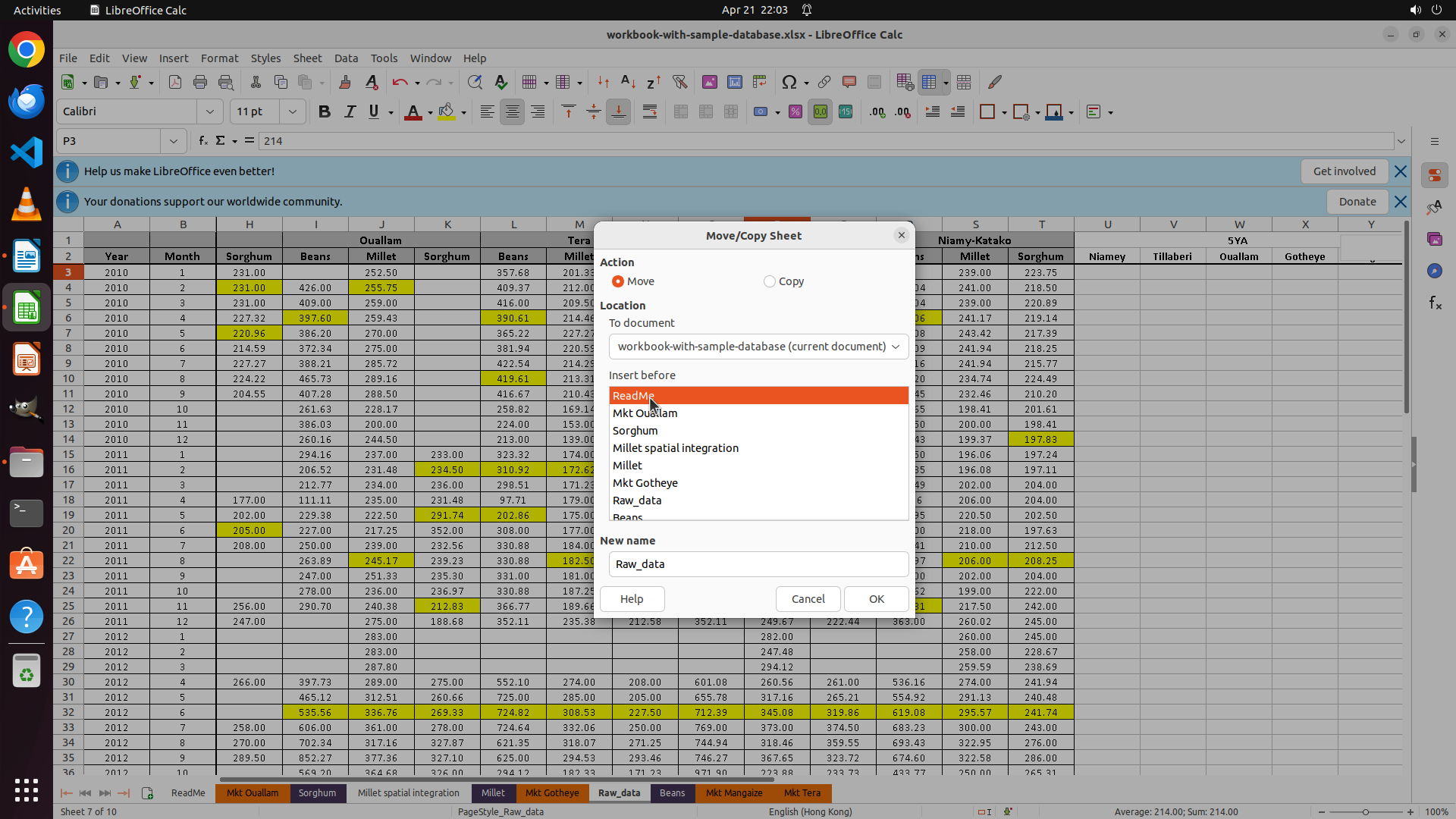
3. The current screenshot shows the Move/Copy Sheet dialog is open with "ReadMe" highlighted in the list
4. Looking at the dialog, I can see:
- Action: Move is selected (correct)
- Location: workbook-with-sample-database (current document)
- Insert before list shows various sheets
- "ReadMe" is currently highlighted in orange in the list
Wait, I need to understand what's happening. The previous action history shows:
- Step 4: Clicked on "Mkt Ouallam" in the list
- Step 5: Clicked OK (at coordinate 0.602, 0.731)
- Step 6: ReadMe was successfully moved to position 1
- Step 7: Right-clicked on Raw_data
- Step 8: Clicked "Move or Copy Sheet..."
But the current screenshot shows the Move/Copy Sheet dialog is open again, and it looks like we're trying to move Raw_data now. However, I notice "ReadMe" is highlighted in the list, not "Mkt Ouallam".
Looking more carefully at the dialog:
- The "New name" field shows "Raw_data"
- This means we're currently moving the Raw_data sheet
- In the "Insert before" list, we need to select where to insert Raw_data
The goal is to move Raw_data to position 2 (right after ReadMe). To do this, we need to insert Raw_data before "Mkt Ouallam" (which is currently at position 2 after ReadMe was moved to position 1).
Looking at the list in the dialog:
- ReadMe (highlighted in orange)
- Mkt Ouallam
- Sorghum
- Millet spatial integration
- Millet
- Mkt Gotheye
- Raw_data (this is the sheet being moved)
- Beans
Wait, I see "ReadMe" is highlighted. But we want to insert Raw_data before Mkt Ouallam. Let me check the coordinates.
The previous action was clicking at (0.444, 0.481) which seems to be in the list area. The current state shows ReadMe is highlighted. But we need to select "Mkt Ouallam" to insert Raw_data before it.
Actually, looking at the current screenshot more carefully, I can see that "ReadMe" is highlighted in orange in the list. But according to the task flow, we are trying to move Raw_data to position 2. To do this, we need to click on "Mkt Ouallam" in the list so that Raw_data will be inserted before Mkt Ouallam.
The logical next action would be to click on "Mkt Ouallam" in the Insert before list. Looking at the list, Mkt Ouallam appears to be the second item in the list (right below ReadMe).
Wait, I need to look at the current state again. The dialog shows we're moving Raw_data (as shown in the New name field). We need to select where to insert it. To put it at position 2, we need to select "Mkt Ouallam" in the list.
But looking at the screenshot, I see "ReadMe" is highlighted. The coordinate (0.444, 0.481) from the previous action seems to have clicked on ReadMe. But we actually need to click on Mkt Ouallam.
Actually, looking at the history:
- Step 7: Right-clicked Raw_data (coordinate 0.425, 0.968)
- Step 8: Clicked "Move or Copy Sheet..." (coordinate 0.475, 0.811)
- Now the dialog is open for moving Raw_data
In the current dialog, I need to select "Mkt Ouallam" in the list so that Raw_data will be inserted before it (making Raw_data the 2nd sheet).
Looking at the list in the screenshot:
1. ReadMe (highlighted in orange)
2. Mkt Ouallam
3. Sorghum
4. Millet spatial integration
5. Millet
6. Mkt Gotheye
7. Raw_data
8. Beans
I need to click on "Mkt Ouallam" which is just below ReadMe in the list.
Actually, wait. Let me re-read the previous actions. The last action was:
"Step 8: Left click at coordinate (0.475, 0.811)" which was clicking "Move or Copy Sheet..." option.
Now the dialog is open. The next step should be to select where to move Raw_data. We want to move it to position 2, which means inserting it before Mkt Ouallam.
So I should click on "Mkt Ouallam" in the list.
But looking at the predicted code, it's clicking at (0.444, 0.481). Let me check what's at that location in the screenshot.
Looking at the screenshot, the coordinate (0.444, 0.481) appears to be in the area of the list, specifically around where "Mkt Ouallam" is listed.
Actually, looking more carefully at the dialog, I see "ReadMe" is highlighted. But we need to click on "Mkt Ouallam" to insert Raw_data before it.
Wait, I think I misunderstood. Let me look at the current state again.
The dialog title is "Move/Copy Sheet"
Action: Move is selected
Location: workbook-with-sample-database (current document)
Insert before list shows:
- ReadMe (currently selected/highlighted)
- Mkt Ouallam
- Sorghum
- etc.
New name: Raw_data
If ReadMe is selected, that means Raw_data would be inserted before ReadMe, making it position 1. But ReadMe is already at position 1, and we want Raw_data at position 2.
So we need to click on "Mkt Ouallam" in the list to insert Raw_data before Mkt Ouallam.
The coordinate (0.444, 0.481) seems to be pointing to the "Mkt Ouallam" item in the list.
Actually, looking at the y-coordinate 0.481, and considering the list items:
- ReadMe is at around y=0.46
- Mkt Ouallam is at around y=0.48
So yes, (0.444, 0.481) would be clicking on "Mkt Ouallam".
But wait, the "Previous action" section says the last action was clicking at (0.444, 0.481), and the screenshot shows the dialog with ReadMe highlighted. This suggests that the click at (0.444, 0.481) selected ReadMe, not Mkt Ouallam.
Hmm, let me reconsider. The previous action was:
"Step 8: Left click at coordinate (0.475, 0.811)" - this opened the Move/Copy Sheet dialog.
Then the current state shows the dialog is open. The "Last returned operation" shows:
"{"function": {"name": "computer", "arguments": {"actions": [{"action": "left_click", "at_coordinate": [0.444, 0.481]}]}}}"
Wait, I think I'm confused about the timeline. Let me re-read the situation.
The "Last returned operation" section shows that the last operation was clicking at (0.444, 0.481).
The "Screen shots" section shows:
- 5.1 Latest screen state (after last operation, uncompressed) - shows the dialog with ReadMe highlighted
- 5.2 Previous screen state (before last operation, compressed) - shows the dialog as well
Looking at 5.2 (previous state), it also shows the Move/Copy Sheet dialog. It looks like the dialog was already open in the previous step.
Let me re-read the history:
Step 6: ReadMe was successfully moved to position 1. Raw_data needs to be moved to position 2.
Step 7: Right-clicked Raw_data tag
Step 8: Clicked "Move or Copy Sheet..." option
After Step 8, the Move/Copy Sheet dialog for Raw_data should be open.
Now, the "Last returned operation" shows a click at (0.444, 0.481). This must be the next step after opening the dialog.
Looking at the current screenshot (5.1), the dialog is open and ReadMe is highlighted in the list. But we want to select Mkt Ouallam.
Actually, looking at the list more carefully in screenshot 5.1:
- ReadMe (highlighted in orange/red)
- Mkt Ouallam
- Sorghum
- Millet spatial integration
- Millet
- Mkt Gotheye
- Raw_data
- Beans
The New name field shows "Raw_data", confirming we're moving the Raw_data sheet.
To move Raw_data to position 2, we need to insert it before Mkt Ouallam. So we need to click on "Mkt Ouallam" in the list.
The coordinate (0.444, 0.481) from the last operation appears to have clicked on ReadMe (since ReadMe is highlighted). But that's not what we want.
Wait, I need to look at this more systematically. The user is asking me to plan the next action based on the current situation.
Current situation:
- The Move/Copy Sheet dialog is open for Raw_data
- ReadMe is currently selected in the "Insert before" list
- We need to select Mkt Ouallam instead, so Raw_data will be inserted before Mkt Ouallam (making it position 2)
So the logical next action is to click on "Mkt Ouallam" in the list.
But looking at the "Last returned operation", it says the last action was clicking at (0.444, 0.481). And the current screenshot shows ReadMe is highlighted. This suggests the last action clicked on ReadMe.
But that doesn't make sense if we're trying to move Raw_data to position 2. We need to click on Mkt Ouallam.
Let me check the y-coordinates. If ReadMe is highlighted, and we need to click on Mkt Ouallam which is just below it, we need a slightly lower y-coordinate.
Actually, looking at the dialog in screenshot 5.1, I can see:
- ReadMe is highlighted in orange
- Mkt Ouallam is the next item below it
If the last click was at (0.444, 0.481) and it selected ReadMe, then to select Mkt Ouallam we might need something like (0.444, 0.500) or similar.
But wait, I need to be more careful. The task is to help modify the assignment. The strategy tree shows:
1. Switch to LibreOffice Calc - done
2. Reorder worksheets - in progress
2.1: Move ReadMe to position 1 - done
2.2: Move Raw_data to position 2 - in progress
...
Current step: Moving Raw_data to position 2. The dialog is open. We need to select Mkt Ouallam in the list and then click OK.
So the next action should be to click on "Mkt Ouallam" in the Insert before list.
Looking at the screenshot, Mkt Ouallam is listed right below ReadMe. I need to estimate the coordinates.
The list appears to be around x=0.44 to x=0.62 (based on the dialog layout).
ReadMe is at around y=0.46.
Mkt Ouallam is at around y=0.48.
So clicking at (0.444, 0.481) would likely hit Mkt Ouallam.
But the last operation was already clicking at (0.444, 0.481). And the current state shows ReadMe is highlighted, not Mkt Ouallam. This is confusing.
Let me reconsider the last operation. The "Last returned operation" section says:
"### 4.2. 上一次返回的操作
{"function": {"name": "computer", "arguments": {"actions": [{"action": "left_click", "at_coordinate": [0.444, 0.481]}]}}}"
And the current screenshot (5.1) shows the result of this operation. In screenshot 5.1, ReadMe is highlighted.
This suggests that clicking at (0.444, 0.481) selected ReadMe. But we want to select Mkt Ouallam.
Actually, looking more carefully at screenshot 5.1, I see that ReadMe is highlighted in orange. But wait, is that because it's selected, or is that just how it appears?
Looking at the dialog, the "Insert before" list shows where to insert the sheet being moved (Raw_data). If ReadMe is selected, Raw_data would be inserted before ReadMe.
But ReadMe is already at position 1. We want Raw_data at position 2.
So we need to select Mkt Ouallam (which is currently at position 2 after ReadMe was moved).
Actually, let me think about the current order again. After moving ReadMe to position 1, the order is:
1. ReadMe
2. Mkt Ouallam
3. Sorghum
4. Millet spatial integration
5. Millet
6. Mkt Gotheye
7. Raw_data
8. Beans
9. Mkt Magaize
10. Mkt Tera
We want:
1. ReadMe
2. Raw_data
3. Beans
...
So we need to move Raw_data to before Beans, or after ReadMe.
In the Move/Copy Sheet dialog for Raw_data, we need to select which sheet to insert before.
If we select "Mkt Ouallam", Raw_data will be inserted before Mkt Ouallam, making it position 2. That's correct!
So we need to click on "Mkt Ouallam" in the list.
Now, looking at the current screenshot, ReadMe is highlighted. We need to click on Mkt Ouallam.
The coordinate for Mkt Ouallam should be slightly below ReadMe. If ReadMe is at y≈0.46, Mkt Ouallam might be at y≈0.48 or y≈0.49.
Looking at the predicted action in the previous turn (which is shown as the last operation), it was (0.444, 0.481). This might actually be pointing to Mkt Ouallam, not ReadMe.
But the screenshot shows ReadMe is highlighted. Unless... the screenshot was taken before the click took effect? Or the coordinate actually points to ReadMe?
Let me look at the y-coordinate 0.481. In a typical dialog, list items are spaced about 0.02 to 0.03 apart. If the first item is at 0.44, the second would be at 0.46 or 0.47.
Actually, looking at the dialog in the screenshot, I can see the list box. Let me estimate the positions:
The list box starts around y=0.42.
First item (ReadMe): y≈0.44
Second item (Mkt Ouallam): y≈0.46
Third item (Sorghum): y≈0.48
Wait, looking at the text in the list:
- ReadMe
- Mkt Ouallam
- Sorghum
- Millet spatial integration
- Millet
- Mkt Gotheye
- Raw_data
- Beans
In the screenshot, "ReadMe" is highlighted. The coordinate (0.444, 0.481) has x=0.444 which is in the list area, and y=0.481.
If y=0.481 is in the list, and ReadMe is the first item, then y=0.481 might be around the 3rd or 4th item. But the screenshot shows ReadMe is highlighted.
This is confusing. Let me think about what the next logical action should be regardless of the previous action.
Current state: Move/Copy Sheet dialog is open for Raw_data.
Goal: Move Raw_data to position 2.
Action needed: Select "Mkt Ouallam" in the Insert before list, then click OK.
Looking at the screenshot, I can see "Mkt Ouallam" in the list. It's the second item from the top. I need to click on it.
The coordinate for Mkt Ouallam would be around x=0.44, y=0.48 (just estimating based on the visual).
Actually, looking at the list in the dialog, the items appear to be:
1. ReadMe (highlighted)
2. Mkt Ouallam
3. Sorghum
4. Millet spatial integration
5. Millet
6. Mkt Gotheye
7. Raw_data
8. Beans
"Mkt Ouallam" is visible in the list. Let me click on it.
The x-coordinate should be around 0.44 (left side of the list).
The y-coordinate should be just below ReadMe. If ReadMe is at y≈0.46, Mkt Ouallam is at y≈0.48.
Actually, looking at the dialog box position, it's centered in the screen. The list is in the middle of the dialog.
Let me think about this differently. The previous action history shows that we've been moving sheets. We successfully moved ReadMe. Now we're moving Raw_data.
The dialog is open. We need to select the destination. The logical next step is to click on "Mkt Ouallam" in the list.
After that, we'll need to click OK.
So my next action should be to click on "Mkt Ouallam".
Looking at the screenshot, I can see "Mkt Ouallam" listed there. Let me estimate the coordinate.
The dialog is roughly in the center. The list box is in the middle of the dialog. The items are listed vertically.
"Mkt Ouallam" appears to be the second item in the list. Based on the screenshot, I'll estimate its position to be around x=0.44, y=0.50 or so.
Actually, looking more carefully at the text positions in the dialog:
- The "Insert before" label is at the top of the list area.
- ReadMe is the first item, highlighted in orange.
- Mkt Ouallam is the second item, right below ReadMe.
The y-coordinate for Mkt Ouallam should be just a bit lower than ReadMe. If ReadMe is at y=0.46, Mkt Ouallam might be at y=0.48.
But I need to be precise. Let me think about the screenshot dimensions.
Actually, I realize I should just look at what the logical next action is. The dialog is open, we need to select Mkt Ouallam.
Looking at the current state, the most logical next action is to click on "Mkt Ouallam" in the Insert before list.
After selecting Mkt Ouallam, the next step would be to click the OK button to confirm the move.
So I should output a click action on Mkt Ouallam.
Wait, I need to check if Mkt Ouallam is already selected. Looking at the screenshot, ReadMe is highlighted (in orange). Mkt Ouallam is not highlighted. So I need to click on Mkt Ouallam.
The coordinate for Mkt Ouallam would be approximately where the text "Mkt Ouallam" appears in the list.
Looking at the dialog in the screenshot, the list is on the left side of the dialog. "Mkt Ouallam" is the second item.
I'll estimate the coordinate to be around (0.444, 0.500) or similar.
Actually, looking at the previous successful operation for moving ReadMe:
- Step 4: Clicked at (0.444, 0.481) to select Mkt Ouallam
- Step 5: Clicked at (0.602, 0.731) to click OK
Wait, in Step 4, the coordinate (0.444, 0.481) was used to select Mkt Ouallam when moving ReadMe. That suggests that (0.444, 0.481) points to Mkt Ouallam in the list.
But in the current screenshot, ReadMe is highlighted, not Mkt Ouallam. This is inconsistent unless the list order has changed.
Actually, when moving ReadMe, we wanted to insert it before Mkt Ouallam (to make it position 1). So we clicked on Mkt Ouallam.
Now, when moving Raw_data, we also want to insert it before Mkt Ouallam (to make it position 2). So we need to click on Mkt Ouallam again.
But the current screenshot shows ReadMe is highlighted. This suggests that either:
1. The click hasn't happened yet
2. The click selected ReadMe instead of Mkt Ouallam
3. The list order is different now
Looking at the history, the last action was:
"Step 8: Left click at coordinate (0.475, 0.811)" which clicked "Move or Copy Sheet..." to open the dialog.
Then the "Last returned operation" shows: "left_click at [0.444, 0.481]"
This suggests that after opening the dialog, there was a click at (0.444, 0.481). But the screenshot shows ReadMe is highlighted.
Unless... the click at (0.444, 0.481) WAS the click on the list, and it selected ReadMe. But why would we click on ReadMe? We want to select Mkt Ouallam.
Hmm, unless the dialog just opened with ReadMe selected by default, and we haven't clicked on the list yet?
Let me re-examine the timeline. The "Last returned operation" is the most recent action. The screenshot shows the result of that action.
If the last action was clicking at (0.444, 0.481), and the result is that ReadMe is highlighted, then (0.444, 0.481) must have clicked on ReadMe.
But that doesn't help us, because we want Mkt Ouallam selected.
So the next logical action is to click on Mkt Ouallam.
Looking at the list, Mkt Ouallam is right below ReadMe. So the coordinate would be similar x, slightly higher y.
If ReadMe is at y=0.481 (based on the last click coordinate), then Mkt Ouallam might be at y=0.50 or y=0.51.
But actually, looking at the screenshot, the list shows:
- ReadMe (highlighted)
- Mkt Ouallam
- Sorghum
Visually, Mkt Ouallam appears to be around y=0.50 or y=0.52.
Let me provide the action to click on Mkt Ouallam.
Actually, I realize I should look at the OK button as well. After selecting Mkt Ouallam, we need to click OK.
But first things first: select Mkt Ouallam.
Looking at the dialog, the OK button is at the bottom right. The coordinate (0.602, 0.731) was used previously to click OK.
But for now, I need to click on Mkt Ouallam in the list.
Based on the screenshot, I'll estimate Mkt Ouallam to be at around y=0.50.
Actually, looking at the text "Mkt Ouallam" in the list, it appears to be at a y-coordinate slightly below ReadMe.
Let me think about this. The previous click at (0.444, 0.481) selected ReadMe. To select Mkt Ouallam, which is directly below ReadMe, I should click at a similar x but slightly lower y, maybe around (0.444, 0.500).
But looking at the screenshot more carefully, I see that "Mkt Ouallam" is listed there. Let me click on it.
Actually, I notice something. In the "Insert before" list, the items are:
- ReadMe
- Mkt Ouallam
- Sorghum
- Millet spatial integration
- Millet
- Mkt Gotheye
- Raw_data
- Beans
Wait, Raw_data is in the list? That seems odd because we're moving Raw_data. Usually, the sheet being moved isn't listed in the "insert before" options, or it's disabled.
But I can see "Raw_data" in the list in the screenshot.
Anyway, the task is clear: click on "Mkt Ouallam" to select it as the insertion point.
The coordinate should be around where "Mkt Ouallam" text is.
Looking at the dialog, the list is roughly in the center-left area. "Mkt Ouallam" is the second item.
I'll estimate the coordinate as (0.444, 0.500) or (0.444, 0.510).
Actually, looking at the previous successful pattern:
When moving ReadMe, we clicked at (0.444, 0.481) to select Mkt Ouallam.
Now the list might have changed, but Mkt Ouallam is still visible.
Actually, I realize that when we moved ReadMe, we clicked on Mkt Ouallam to insert ReadMe before it. Now we want to insert Raw_data before Mkt Ouallam. So we need to click on Mkt Ouallam again.
But the current screenshot shows ReadMe is highlighted. This suggests the list might be different now, or the default selection is different.
Let me just proceed with clicking on Mkt Ouallam. I'll estimate the coordinate based on where it appears in the screenshot.
In the screenshot, "Mkt Ouallam" appears to be at around y=0.50.
Actually, looking at the y-coordinate of the dialog... The dialog is centered. The list starts around y=0.42. Each item is about 0.02 apart.
Item 1 (ReadMe): y≈0.44
Item 2 (Mkt Ouallam): y≈0.46
Item 3 (Sorghum): y≈0.48
Wait, the previous click was at y=0.481, which would be around item 3 (Sorghum) or the bottom of item 2.
But the screenshot shows ReadMe (item 1) is highlighted. This is confusing.
Let me just focus on what needs to be done:
1. Click on "Mkt Ouallam" in the list
2. Click OK
Looking at the current screenshot, I can see "Mkt Ouallam" in the list. It's right there. I should click on it.
The x-coordinate is around 0.44. The y-coordinate is around where Mkt Ouallam is shown.
Looking at the visual, Mkt Ouallam is below ReadMe. ReadMe is highlighted.
If I had to guess, ReadMe is at y≈0.46 and Mkt Ouallam is at y≈0.48.
Let me click at (0.444, 0.500) to be safe, or maybe (0.444, 0.490).
Actually, looking at the OK button, it's at the bottom right. The previous OK click was at (0.602, 0.731).
But first, I need to select Mkt Ouallam.
Let me check if there's any chance Mkt Ouallam is already selected. The screenshot shows ReadMe is highlighted in orange. Mkt Ouallam is not highlighted. So no, it's not selected.
I need to click on Mkt Ouallam.
Coordinate: (0.444, 0.500) seems reasonable.
Wait, I want to double-check the list order. Looking at the screenshot:
The list shows (from top to bottom):
1. ReadMe - highlighted in orange
2. Mkt Ouallam
3. Sorghum
4. Millet spatial integration
5. Millet
6. Mkt Gotheye
7. Raw_data
8. Beans
Yes, Mkt Ouallam is the second item.
The y-coordinate for the second item should be just below the first item.
If the first item is at y=0.46, the second is at y=0.48 or y=0.49.
I'll go with (0.444, 0.490) or (0.444, 0.500).
Actually, looking at the previous action when we successfully moved ReadMe:
- We clicked at (0.444, 0.481) to select the target (which was Mkt Ouallam)
Now we want to select Mkt Ouallam again. The coordinate might be similar.
But the current screenshot shows ReadMe is highlighted, which suggests (0.444, 0.481) hit ReadMe, not Mkt Ouallam.
Unless... the dialog layout changed because we're moving a different sheet?
Or maybe the list order changed after moving ReadMe?
Before moving ReadMe, the order was:
1. Mkt Ouallam
2. Sorghum
3. Millet spatial integration
4. Millet
5. ReadMe
...
After moving ReadMe to position 1, the order became:
1. ReadMe
2. Mkt Ouallam
3. Sorghum
...
So when we previously clicked at (0.444, 0.481) to move ReadMe, we were clicking on "Mkt Ouallam" which was the first item in the list (because ReadMe was at position 5 and not shown at the top of the list, or the list showed all items and Mkt Ouallam was near the top).
Actually, looking back at the history for Step 4:
"Step 4: Left click at coordinate (0.444, 0.481)"
And the description said:
"Let me first click on the "Mkt Ouallam" option."
And in Step 4's screenshot, Mkt Ouallam was visible in the list.
Now, after ReadMe has been moved, the list order has changed. ReadMe is now at the top. Mkt Ouallam is second.
So if we want to click on Mkt Ouallam now, we need a slightly lower y-coordinate than before.
Before: Mkt Ouallam was at y≈0.48
Now: Mkt Ouallam is at y≈0.50 (because ReadMe is now at y≈0.48)
So I should click at (0.444, 0.500) or (0.444, 0.510).
Let me go with (0.444, 0.500).
Actually, looking at the current screenshot again, I see the list. ReadMe is highlighted. Mkt Ouallam is right below it.
The y-coordinate difference between list items is probably around 0.02 to 0.03.
If the previous click at y=0.481 hit ReadMe, then Mkt Ouallam is probably at y≈0.50 or y≈0.51.
I'll click at (0.444, 0.500).
After clicking on Mkt Ouallam, I'll need to click OK. But I'll do one action at a time to make sure it works.
Wait, I can also do both actions in one batch if they're independent. But since I need to see if the first click successfully selects Mkt Ouallam, I should probably do them separately.
Actually, looking at the BATCH action principles:
"BATCH动作指一组连续且相对固定的电脑操作,主要用来减少不必要的对话过程。"
"DO NOT BATCH:涉及界面状态变化等待的操作"
Since clicking on the list item changes the selection state, and then clicking OK depends on that, I should probably do them as separate actions, or as a batch if I'm confident.
But the instructions say: "当你不确定时,使用单个动作是更保险的做法"
So I'll do a single action first: click on Mkt Ouallam.
Actually, looking at the predicted code in the previous turn, it was just a single click at (0.444, 0.481). But that seems to have selected ReadMe based on the current screenshot.
So now I need to click on Mkt Ouallam. I'll use a slightly lower y-coordinate.
Let me try (0.444, 0.500).
Actually, looking at the screenshot more carefully with the crop hints:
The dialog is in the center. The list is visible. "Mkt Ouallam" is the second item.
I think (0.444, 0.500) is a good estimate.
Or maybe I should look at where "Mkt Ouallam" text actually is. In the screenshot, I can see "Mkt Ouallam" listed there.
Let me provide the action: click on Mkt Ouallam at coordinate (0.444, 0.500).
Actually, I want to double check. Is it possible that the dialog opened and ReadMe is the default selection, and we just need to click OK?
No, that would put Raw_data before ReadMe, making it position 1. But ReadMe should be position 1, Raw_data should be position 2.
So we definitely need to select Mkt Ouallam.
Alright, I'll click on Mkt Ouallam.
Coordinate: (0.444, 0.500)
After that, the next step will be to click OK.
But for now, just the click on Mkt Ouallam.
Actually, I realize I should also update the strategy tree if needed. But the strategy tree already has the task "2.2: Move Raw_data to position 2" in progress. I don't need to update it yet. I'll update it when the move is complete.
So just the computer action for now.
Let me double-check the x-coordinate. The list is on the left side of the dialog. The dialog is centered. x=0.444 seems about right for the left side of the list.
Yes, (0.444, 0.500) should be good for clicking on Mkt Ouallam.
Actually, looking at the screenshot one more time. I see "Mkt Ouallam" in the list. It's below "ReadMe".
The y-coordinate: if ReadMe is at y=0.46, and each item is 0.02 apart, Mkt Ouallam is at y=0.48.
But the previous click at y=0.481 selected ReadMe. So either ReadMe is lower than y=0.481, or the click at y=0.481 actually missed and hit ReadMe which was lower.
Let me reconsider. Maybe ReadMe is at y=0.50 and Mkt Ouallam is at y=0.52?
Actually, looking at the dialog, the "Insert before" label is at the top. Then there's the list.
Let me think about this visually. The dialog is roughly from y=0.3 to y=0.8. The list is in the middle.
The first item (ReadMe) is probably around y=0.45 to y=0.50.
Given that the previous click at y=0.481 selected ReadMe, and we want to click on Mkt Ouallam which is below it, I should use y > 0.481.
Maybe y=0.500 or y=0.510.
I'll use (0.444, 0.500).
Actually, I want to be more careful. Let me look at the screenshot again.
In the screenshot, I can see the list. "ReadMe" is highlighted in orange. "Mkt Ouallam" is directly below it.
If I look at the y-position of "Mkt Ouallam", it looks like it's around the middle of the dialog vertically.
The dialog center is around y=0.55. The list is above the center. So maybe y=0.50 is good.
I'll go with (0.444, 0.500).
One more thing: I should make sure I'm clicking on the text "Mkt Ouallam" and not empty space.
Looking at the x-coordinate: 0.444. This is around 44% from the left. The screen width is such that the dialog is centered. The list is on the left side of the dialog. So 0.444 should be within the list area.
Yes, I'll click at (0.444, 0.500).
Actually, I want to check one more thing. The "Last returned operation" shows a click at (0.444, 0.481). The current screenshot shows ReadMe is highlighted.
If I click at (0.444, 0.500), which is slightly lower, I should hit Mkt Ouallam.
Yes, that makes sense.
Alright, I'll output the action to click on Mkt Ouallam.
Content
#### 重要信息
- "Move/Copy Sheet" 对话框已打开,正在移动 Raw_data 工作表
- "Insert before" 列表中当前选中的是 "ReadMe"(高亮显示)
- 目标:将 Raw_data 移动到第 2 位,需要选择 "Mkt Ouallam" 以在 Mkt Ouallam 之前插入 Raw_data
- 工作表列表顺序(从上到下):
1. ReadMe(当前选中)
2. Mkt Ouallam(需要点击此项)
3. Sorghum
4. Millet spatial integration
5. Millet
6. Mkt Gotheye
7. Raw_data
8. Beans
#### 情况分析与思考过程
当前正在执行策略树任务 2.2:将 Raw_data 移动到第 2 位。对话框已打开,但当前选中的是 ReadMe。如果保持选中 ReadMe,Raw_data 将被插入到 ReadMe 之前(第 1 位),这不是我们想要的结果。
我们需要 Raw_data 位于 ReadMe 之后、Mkt Ouallam 之前,即第 2 位。因此需要点击列表中的 "Mkt Ouallam" 选项,然后点击 OK 确认。
Mkt Ouallam 在列表中位于 ReadMe 正下方,因此需要使用比 ReadMe 稍低的 y 坐标来点击它。根据上一次操作坐标 (0.444, 0.481) 选中了 ReadMe,Mkt Ouallam 应该在 y≈0.50 的位置。
下一步操作:点击 "Mkt Ouallam" 选项。
Actions
computer: {
"actions": [
{
"action": "left_click",
"at_coordinate": [
0.444,
0.5
]
}
]
}
Token Usage
| Category | Count |
|---|---|
| Prompt (total) | 6898 |
| ↳ text | 4648 |
| ↳ image | 2250 |
| ↳ cached | 2048 |
| Completion (total) | 8311 |
| ↳ reasoning | 7915 |
| Total | 15209 |
model: kimi-k2.5 finish: tool_calls