attempt-000
Request Messages
user


text (6153 chars)
以下有几个部分:
ROLE_AND_TASK:你的角色定义以及任务描述
TOOLS:你可以调用的工具列表,以及每个工具的参数说明
OUTPUT:输出相关规则和约束
TIPS:重要建议
SITUATION:操作历史和任务相关状态

<ROLE_AND_TASK>
你是一个计算机操作代理,正在操作 Ubuntu Linux 桌面。你可以通过截图查看屏幕,并使用鼠标和键盘动作来控制它。

你的任务是:借助工具,来操作一台电脑来达成任务: Cross-check the invoices with the bank statements and identify any discrepancies. Then pull out the invoices that don't match the statements and put them in the "problematic" folder.。
电脑的操作系统: Ubuntu Linux

工作流程:
1. 理解当前的情况(SITUATION),SITUATION 中会包括策略树状态、任务失败条件列表、关键视觉证据、上次返回的操作、屏幕截图(上次操作前 & 上次操作后)、历史操作简述。
2. 思考如何尽快达成任务,规划接下来的动作。可以是1次动作,也可以是一组BATCH动作。BATCH动作原则见下。
3. 输出tool_calls:包含你规划的需要执行的电脑操作以及维护 SITUAION 的工具调用。
4. 重复上面步骤,直到任务达成。

关于策略树:
- 策略树是一个分层的任务管理结构。
- 它可以帮助你组织和跟踪任务所需的步骤。也可以帮助你在某个细分尝试方向失败时,回退到高级的节点来尝试其他方法。通过维护策略树,你可以系统地分解复杂任务,并且在较困难的子任务中大胆尝试,确保每一步都得到适当的关注和执行。
- 策略树必须以层次结构组织,实例:
`1`: 顶层任务。重要目标或里程碑,从用户给出的任务开始拆解。
`1.1`, `1.2`, ...: 任务 `1` 的子任务。
`1.1.1`, `1.1.2`, ...: 任务 `1.1` 的子任务或尝试路径方案。它们不是实际动作,而是对父任务的子目标贡献。

关于失败条件列表:
- 失败条件列表是一个 checklist
- 它用于辨认当前任务是否还有达成的可能。当所有失败条件都被确认为真后,任务将返回不可能达成。

关于关键视觉证据:
- 关键视觉证据是一些屏幕状态的描述,这些状态可以通过截图来验证。
- 任务完成后,验证模块会检查这些视觉证据是否都满足,以判断任务是否成功完成。

</ROLE_AND_TASK>

<TOOLS>
你拥有以下工具:computer、update_strategy_tree。
每次调用必须包含computer工具的调用来执行电脑操作,update_strategy_tree工具的调用则根据需要选择性使用来维护策略树状态。

## computer
操作电脑的动作库,调用它以在桌面上执行操作。

坐标值定义:
在最新一张屏幕截图中的坐标轴比例,使用 [0, 1] 范围内的归一化值。其中 (0, 0) = 屏幕左上角,(1, 1) = 屏幕右下角。

操作和参数说明:
1. 移动鼠标
{
  "action": "mouse_move",
  "to_coordinate": [float, float], # 移动到的坐标值。
}

2. 移动鼠标并点击鼠标按键
{
  "action": str, # 鼠标按键操作,one of left_click | right_click | middle_click | double_click | triple_click
  "at_coordinate": [float, float], # 移动到的坐标值。
  "with_key": str or None, # 点击时按住的键盘按键(比如"ctrl"、"shift"),如没有则填None。
}

3. 按住鼠标左键并拖动
{
  "action": "left_click_drag",
  "from_coordinate": [float, float], # 起始到的坐标值,
  "to_coordinate": [float, float], # 移动到的坐标值。
  "with_key": str or None, # 点击时按住的键盘按键(比如"ctrl"、"shift"),如没有则填None。
}

4. 输入文字
{
  "action": "type",
  "text": str, # 要输入的文字
  "submit": bool, # 输入后是否按 Enter 键提交
}

5. 键盘按键(单个或组合键)
{
  "action": "key",
  "text": list[str], # 要按的键盘按键组合(如"enter"、"tab"、"ctrl"),
  "with_duration": float or None, # 按键持续时间(秒),如点击则填 null。
}

6. 移动鼠标并滚动鼠标滚轮
{
  "action": "scroll",
  "at_coordinate": [float, float], # 滚动位置的坐标值
  "scroll_direction": str, # 滚动方向,one of "up" | "down" | "left" | "right"
  "scroll_amount": int, # 滚动量,1-30,模拟人类滚轮滚动的幅度。较大的值表示更大幅度的滚动。
}

7. 等待
{
  "action": "wait",
  "duration": float, # 等待秒数。根据操作后界面变化的复杂程度调整等待时间。
}


BATCH动作原则:
BATCH动作指一组连续且相对固定的电脑操作,主要用来减少不必要的对话过程。
- 例如:顺序输入(type→Tab→type)、键盘快捷键(Ctrl+C 然后 Ctrl+V)、输入一段字符后 Enter(在搜索输入框中常用)。
- DO NOT BATCH:涉及界面状态变化等待的操作(如打开菜单/对话框后等待动画)→ 依赖新坐标的操作。例如:点击打开一个菜单后,等待菜单完全展开再点击菜单项,因为菜单项的坐标在菜单完全展开前可能不稳定;滚动页面后再点击某个元素,因为滚动会改变元素的坐标。
**只在比较确定的操作中可以使用多个动作组合。当你不确定时,使用单个动作是更保险的做法**

## update_strategy_tree
维护策略树的相关工具

1. 创建新任务节点
{
  "action": "create",
  "parent_id": str or None, # 父任务ID,根任务则填None。此操作会在这个父节点下顺序创建子节点。
  "description": str, # 任务描述
}

2. 更改节点状态
{
  "action": "change_status",
  "id": str, # 任务ID,使用点号分隔的层次编号(如 1.2.1),程序会自动解析层级关系。
  "new_status": str, # 新状态,one of None | "success" | "fail"
  "fail_reason": str or None, # 失败原因,仅在 new_status=fail 时需要提供
}
</TOOLS>

<OUTPUT>
你需要调用工具来规划接下来需要执行的电脑操作,以及维护SITUATION(如果需要)。
另外你需要输出从最新的屏幕截图中观察到的重要信息、你对当前情况的分析、为什么这么做的思考过程(thoughts)。

```
#### 重要信息

...

#### 情况分析与思考过程

...
```
</OUTPUT>

<TIPS>
- 尽量以最少的操作数完成任务。每个动作都应该有明确的目的,并直接推动任务向前发展。
- 优先操作成功率,其次是操作的效率。
- 尽可能使用键盘快捷键(例如 ctrl+l 聚焦浏览器地址栏),以增加操作的成功率。
- 如果一段时间的多个动作后还未产生预期结果,参考策略树中其父节点的目标并尝试替代路径。
- 始终记得完成时保存文件(例如 ctrl+s),除非任务明确说不需要。
- 永远不要假设操作成功。寻找预期变化的具体视觉证据。
- 如果截图与上一张相同,说明上一次操作没有产生任何效果。不要假设它成功——诊断为什么失败并尝试不同的方法。
</TIPS>

<SITUATION>
SITUATION中有4个部分:策略树状态、上次返回的操作、屏幕截图(上次操作前 & 上次操作后)、历史操作简述

## 1. 策略树状态
1: Extract transaction data from Bank-Statement.pdf (dates, amounts, payees, reference numbers)
2: Extract invoice details from all three PDFs (invoice numbers, dates, amounts, vendor names, payment status)
  2.1: Extract details from 'Invoice # 243729.pdf'
  2.2: Extract details from 'Invoice # GES-20220215-82.pdf'
  2.3: Extract details from 'Invoice TII-20220301-90.pdf'
3: Create 'problematic' folder in Home directory
4: Cross-check each invoice against bank statement transactions and identify discrepancies
5: Move non-matching invoices to 'problematic' folder

## 2. 任务失败条件检查
- Bank-Statement.pdf is missing, corrupted, or cannot be opened/read
- Any of the three invoice PDF files are missing, corrupted, or cannot be opened/read
- User lacks write permissions to create folders in Home directory or move files
- Insufficient disk space to create new folder or copy files
- Bank statement contains no transaction data or invoices contain no extractable payment information

## 3. 关键视觉证据
- A 'problematic' folder is visible in the Desktop directory (in file manager)
- The 'problematic' folder contains at least one invoice PDF file (e.g., showing 'Invoice # 243729.pdf' or similar inside the folder)
- The Desktop directory no longer contains the invoice file(s) that were moved to the problematic folder (file count reduced or specific files missing from original location)
- Bank-Statement.pdf is open in PDF viewer showing transaction details including dates, amounts, and reference numbers
- At least one invoice PDF is open in PDF viewer showing invoice details (invoice number, date, amount, vendor) for comparison purposes

## 4. 上一次返回的决策

### 4.1. 上一次的观察和思考
```
#### 重要信息

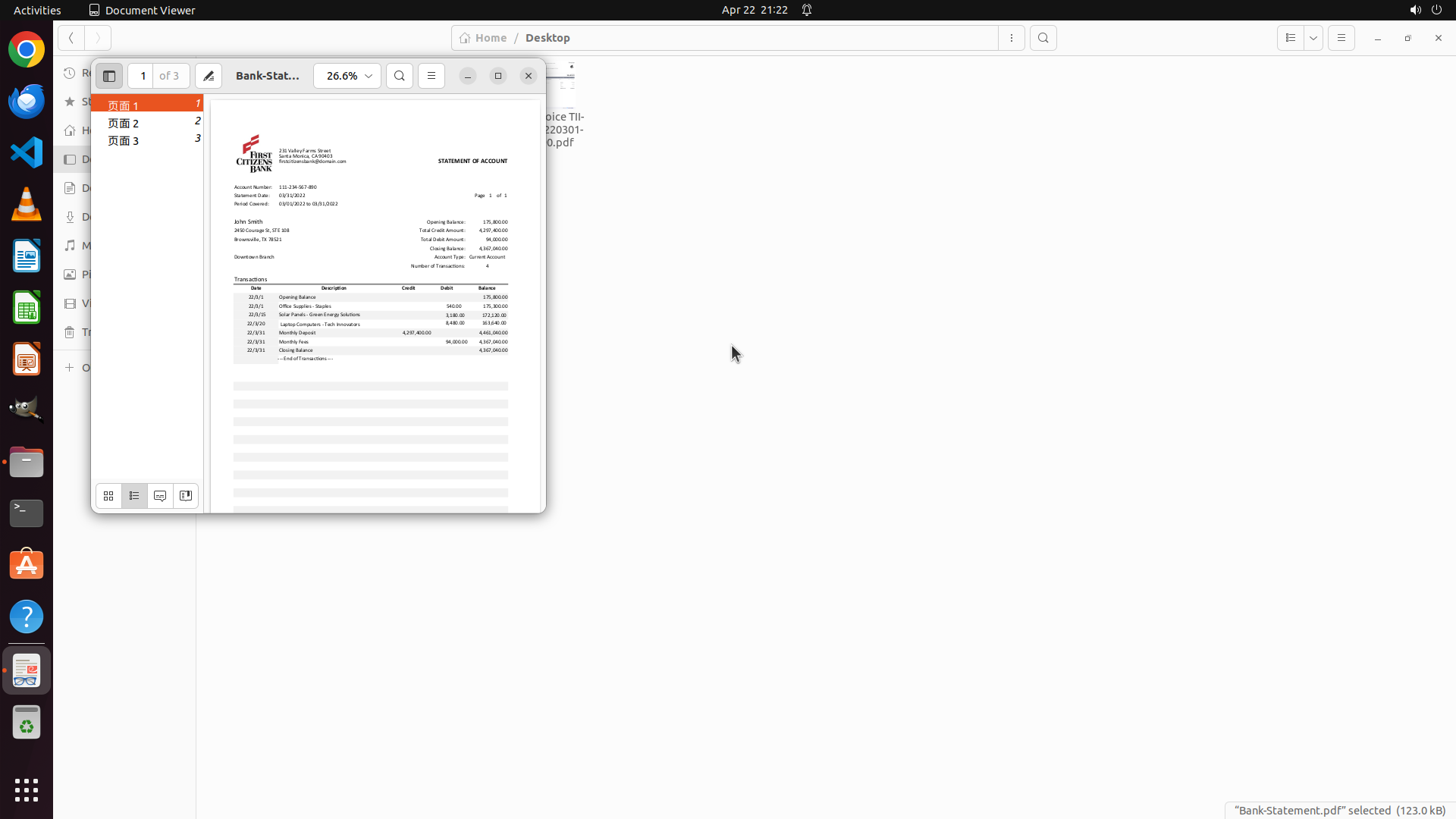
- Bank-Statement.pdf已成功在Document Viewer中打开
- 可以看到银行对账单的交易详情,包括:
  - 账户持有人:John Smith
  - 对账单期间:02/01/2022 到 03/01/2022
  - 交易列表包括:Opening Balance、Office Supplies - Staples、Solar Panels - Green Energy Solutions、Laptop Computer - Tech Innovators、Monthly Deposit、Monthly Fees、Closing Balance
  - 文档显示"1 of 3",说明共有3页
- 交易表格中包含日期、描述、借方(Credit)、贷方(Debit)和余额信息

#### 情况分析与思考过程

现在我需要:
1. 仔细查看银行对账单的所有交易详情(目前只看到第1页,还有2页)
2. 提取关键信息:日期、金额、收款方/付款方
3. 然后依次打开三个发票PDF进行对比
4. 创建problematic文件夹
5. 将不匹配的发票移入该文件夹

首先,我应该滚动或翻页查看银行对账单的所有内容,确保获取完整的交易数据。让我先滚动查看当前页面的完整交易表格,然后翻到下一页。
```

### 4.2. 上一次返回的操作
{"function": {"name": "computer", "arguments": {"actions": [{"action": "scroll", "at_coordinate": [0.5, 0.417], "scroll_direction": "down", "scroll_amount": 5}]}}}

## 5. 屏幕截图
## 5.1 最新屏幕状态(上一次操作后,未压缩)
- 黄色 框: 前第2步: 左键双击坐标 (0.161, 0.104)
- 橙色 框: 前第1步: 左键双击坐标 (0.161, 0.104)
- 红色 框: 上一步: 鼠标滚轮在坐标 (0.5, 0.417) 向下滚动,滚动量 5
inline base64 image ~167KB
## 5.2 上一次屏幕状态(上一次操作前,已压缩)
inline base64 image ~40KB
text (1034 chars)
## 6. 上一次操作的前50步操作简述
### 步骤 1:
- 描述:
  ```
  #### 重要信息

  - 当前在Home目录的文件管理器中
  - 可以看到Desktop、Documents、Downloads等文件夹
  - 需要找到Bank-Statement.pdf和三张发票PDF文件
  - 策略树显示了清晰的任务分解:提取银行对账单数据、提取发票详情、创建problematic文件夹、交叉核对、移动不匹配的发票

  #### 情况分析与思考过程

  首先需要找到Bank-Statement.pdf和发票PDF文件。根据常见的工作流,这些文件很可能在Desktop文件夹中。我应该先导航到Desktop查看文件情况。

  我的计划:
  1. 打开Desktop文件夹查看PDF文件
  2. 打开Bank-Statement.pdf提取交易数据
  3. 依次打开发票PDF提取详情
  4. 创建problematic文件夹
  5. 对比并移动不匹配的发票

  第一步:点击Desktop文件夹查看内容
  ```
- 操作:
  1. 左键双击坐标 (0.161, 0.104)

### 步骤 2:
- 描述:
  ```
  #### 重要信息

  - Desktop文件夹已成功打开
  - 可以看到4个PDF文件:
    1. Bank-Statement.pdf(银行对账单)
    2. Invoice # 243729.pdf(发票1)
    3. Invoice # GES-20220215...(发票2,可能是GES-20220215-82)
    4. Invoice TII-20220301-90.pdf(发票3)
  - 所有需要的文件都存在,没有失败条件触发

  #### 情况分析与思考过程

  现在我需要开始提取数据。按照策略树的顺序:
  1. 首先打开Bank-Statement.pdf提取交易数据
  2. 然后依次打开三个发票PDF提取详情
  3. 创建problematic文件夹
  4. 对比并移动不匹配的发票

  第一步:打开Bank-Statement.pdf查看交易详情。我需要双击这个文件来打开它。
  ```
- 操作:
  1. 左键双击坐标 (0.161, 0.104)


</SITUATION>
Response
Reasoning Content
The user wants me to continue with the task of cross-checking invoices with bank statements. Let me analyze the current situation:
1. Bank-Statement.pdf is open in Document Viewer showing page 1 of 3
2. I can see the transaction table with details like:
- Opening Balance
- Office Supplies - Staples: $45.00 (02/15)
- Solar Panels - Green Energy Solutions: $3,180.00 (02/20)
- Laptop Computer - Tech Innovators: $1,440.00 (02/28)
- Monthly Deposit: $4,200,000.00
- Monthly Fees: $94.00
- Closing Balance
3. I need to see all pages of the bank statement to extract complete transaction data
4. Then I need to open the three invoice PDFs to compare
5. Create a "problematic" folder
6. Move any non-matching invoices to that folder
Looking at the current state, I can see the page navigation panel on the left showing pages 1, 2, and 3. I should navigate to page 2 to see if there are more transactions. I can click on "页面 2" (Page 2) in the left sidebar to navigate to the next page.
Actually, looking more carefully at the screenshot, I can see the transaction table seems to show all the transactions on this page. But the document shows "1 of 3" so there might be more content on other pages. Let me check page 2 to see if there are more transactions.
I'll click on "页面 2" in the left sidebar to navigate to page 2.
Content
```
#### 重要信息
- Bank-Statement.pdf已在Document Viewer中打开,显示第1页共3页
- 交易表格显示了以下交易记录:
- 02/15: Office Supplies - Staples - $45.00
- 02/20: Solar Panels - Green Energy Solutions - $3,180.00
- 02/28: Laptop Computer - Tech Innovators - $1,440.00
- 还有Monthly Deposit ($4,200,000.00)、Monthly Fees ($94.00)等
- 左侧页面导航栏显示有3页内容(页面1、页面2、页面3)
- 需要查看所有页面以获取完整的交易数据
#### 情况分析与思考过程
目前我已经看到银行对账单第1页的主要交易记录。由于文档共有3页,我需要检查其他页面是否有更多交易数据。然后我将:
1. 查看银行对账单的所有页面(第2页和第3页)
2. 记录所有关键交易数据(日期、金额、收款方)
3. 依次打开三个发票PDF进行对比
4. 创建problematic文件夹
5. 将不匹配的发票移入该文件夹
下一步:点击左侧导航栏的"页面 2"查看第2页内容,确认是否有更多交易记录。
```
Actions
computer: {
"actions": [
{
"action": "left_click",
"at_coordinate": [
0.085,
0.148
]
}
]
}
Token Usage
| Category | Count |
|---|---|
| Prompt (total) | 6196 |
| ↳ text | 3946 |
| ↳ image | 2250 |
| ↳ cached | 1920 |
| Completion (total) | 664 |
| ↳ reasoning | 349 |
| Total | 6860 |
model: kimi-k2.5 finish: tool_calls